
When Should Similar Keywords Get Separate Pages?
Sort related search phrases into useful keyword groups.
When Should Similar Keywords Have Separate Pages?
Similar keywords need separate pages when searchers expect meaningfully different answers, actions, or page types. If two queries describe the same task and one strong page can satisfy both, group them under a single primary URL. If one query requires instructions while another calls for a product comparison, service listing, or different troubleshooting process, separate pages may serve readers better. Check actual search results and your existing content before deciding.
Keyword List Grouper
Sort related search phrases into useful keyword groups.
Group related keywords
Groups are based on overlapping words, not actual search intent or live search results. Review clusters manually before assigning a target page.
Decide When to Combine Keywords and When to Split Pages
Two searches can look almost identical yet require different articles. Two others can use different wording but lead to exactly the same answer. That is why deciding whether similar keywords should share a URL is an editorial and search-intent decision, not a vocabulary-matching exercise.
For a growing website, unnecessary splitting creates near-duplicate guides, weakens navigation, and makes updates harder. Combining everything into one enormous guide creates the opposite problem: a reader who needs a specific tutorial or comparison may struggle to find it. This guide gives you a repeatable decision test, concrete SEO examples, and a review process for existing WordPress pages. The sample queries and URLs are hypothetical examples, not measurements or live ranking tests.
Start With the Job the Searcher Wants Done
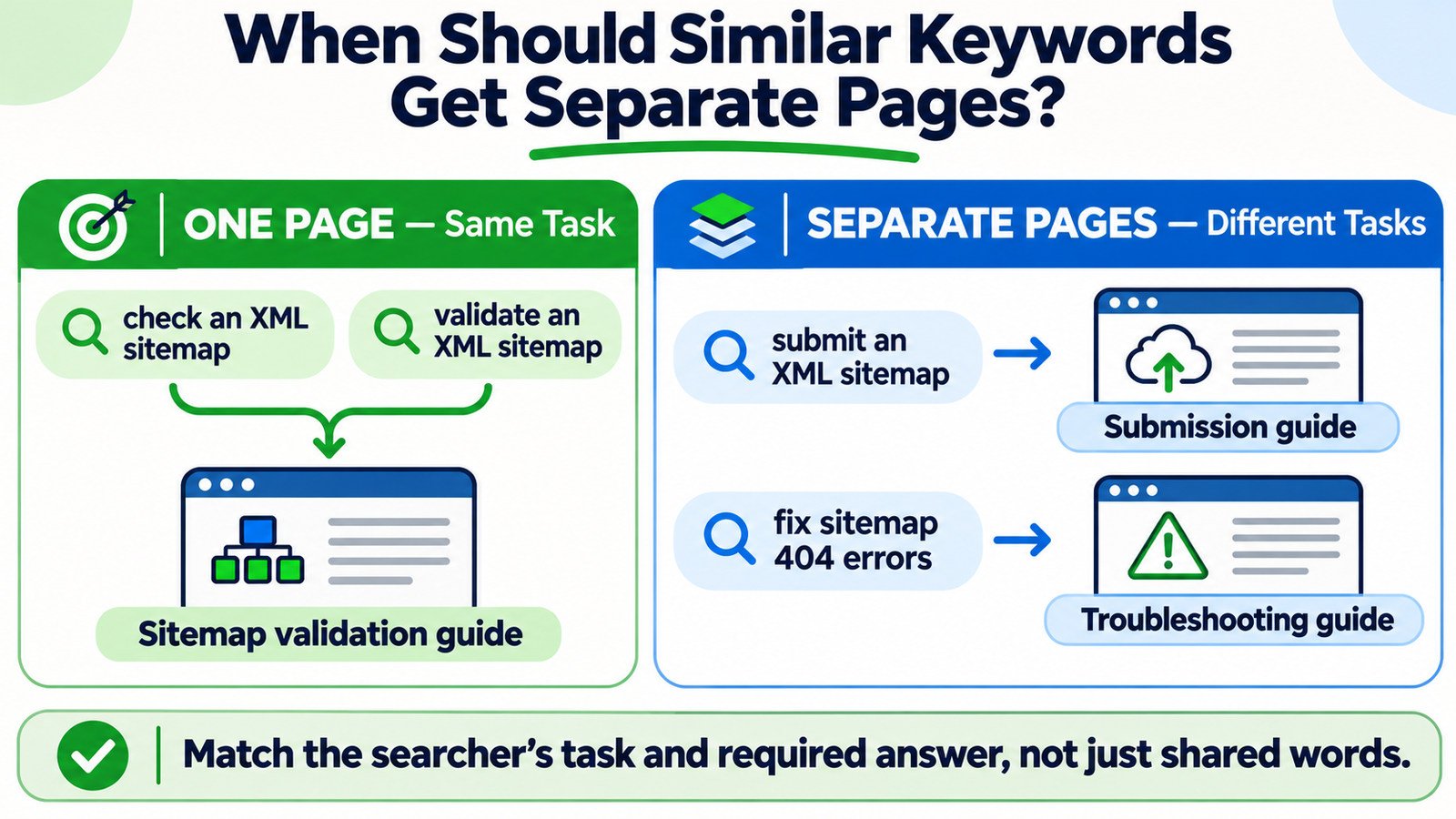
Write a one-sentence description of the task behind each query: check whether a sitemap is valid, submit a sitemap in Search Console, or repair a sitemap URL returning 404. These tasks relate to the same technical SEO object but require different instructions. A useful page should be designed around the task, not the shared noun.
Now compare “check XML sitemap” and “validate XML sitemap.” If both queries are being used to find problems in sitemap structure and URLs, a single validation guide may satisfy them. The wording differs, but the job is essentially the same. You can naturally answer both without building two near-identical posts.
Intent labels such as informational, commercial, transactional, and navigational provide a starting point. They are not detailed enough to make the split decision alone. Two informational queries can require entirely different procedures; two commercial queries might describe the same purchase decision.
Use Examples That Separate the Topic From the Task
Consider the following hypothetical keyword pairs. The recommended page decisions assume the descriptions represent what searchers actually want; verify ambiguous cases against relevant search results before publishing.
| Similar or related searches | What changes? | Working decision |
|---|---|---|
| “check XML sitemap” / “validate XML sitemap” | Usually the same validation task | One page covering both terms |
| “submit XML sitemap” / “fix sitemap 404 errors” | Submission workflow versus troubleshooting | Separate pages with distinct steps |
| “301 redirect explained” / “what is a permanent redirect” | Often the same definition and basic explanation | One page, unless research proves a different task |
| “301 vs 302 redirect” / “set up 301 redirect in WordPress” | Comparison versus implementation instructions | Separate pages can be useful |
| “compress images for WordPress” / “reduce WordPress image size” | Potentially the same optimization job | One page if methods and audience match |
| “why is my image blurry” / “compress website images” | Quality diagnosis versus file-size reduction | Separate pages when guidance differs |
Notice that the decision can change after you inspect the results. A query about checking a sitemap might mean verifying XML syntax, checking whether a URL is included, or finding a sitemap file. Do not force it into a cluster until you know which task matters to your audience.
Run the Five-Question Page-Splitting Test
For each uncertain pair, answer these questions before approving another WordPress post:
- Same outcome? Would both visitors be satisfied by the same final answer or action?
- Same page type? Do the searches call for the same format, such as a tutorial, comparison, calculator, or category page?
- Same necessary depth? Can a single page cover both fully without making one task a small, buried subsection?
- Same audience and constraints? Are the device, platform, market, user level, or technical circumstances meaningfully different?
- Distinct value? Could you explain why a second URL deserves to exist without pointing to a keyword spelling change?
If the answers point toward the same visitor outcome, start with one clear page. If a second page needs a different workflow, comparison, tool, or decision framework, splitting is more defensible. This is a judgment framework rather than a formal Google ranking formula.
Compare Search Results Without Treating Overlap as a Fixed Rule
Look at representative search results for both queries using a consistent location, language, and device where practical. Record the leading content types, not just the titles: how-to articles, shop categories, tools, definitions, videos, local packs, or product pages. Ask what those formats imply about the reader’s expectations.
If both searches repeatedly surface pages that solve the same task, that supports combining them. If one shows implementation guides and the other comparison articles, the evidence supports distinct pages. But there is no universal SERP-overlap percentage that decides whether you must create another URL. Search results change and some queries have mixed intent.
Do not invent ranking data or promise performance because two SERPs look alike. Capture the date of your review and note any uncertainty. For smaller sites, a brief manual review of important query pairs is often more useful than automatically turning every keyword variation into an article.
Check Existing Pages Before Commissioning New Ones
Start with a short inventory: current URL, page purpose, primary task, target queries, content type, publication status, and last substantial update. Then assign candidate phrases to an existing owner wherever that owner already answers the question well.
The Keyword List Grouper can support your first round of phrase organization. Treat its grouping as an input for editorial review; confirm its live input limits and behavior in WordPress rather than assuming it determines search intent perfectly. Use the Keyword List Cleaner to prepare messy exports while preserving meaningful modifiers such as “not,” “versus,” “price,” and model identifiers.
Next, assign the approved cluster to a real URL using the Keyword-to-Page Mapping Tool. A useful map records whether that URL should be kept, improved, created, consolidated, or left for further review. Do not assign the same primary task to multiple new URLs unless you can articulate their different value.
Use Search Console to Check Which Pages Already Surface
In Google Search Console, open the Search results Performance report. Choose a consistent date range, select a relevant query under Queries, then review Pages to see which of your URLs appeared for it. Repeat with closely related searches or filter by page to see the visible query set associated with one article.
Several URLs appearing for one search is a reason to investigate, not automatic proof of keyword cannibalization. Different pages may answer different interpretations of a broad query. Conversely, one page appearing for two queries does not prove it is the best long-term structure. Compare the content and intent first, then review clicks, impressions, and page context.
Search Console is also not a complete keyword census. Anonymized queries and export or table limits mean some long-tail searches will not appear, while property-level and page-level aggregation may produce different totals. The Search Console CSV Comparison Analyzer may support period comparisons, but keep dates and filters aligned before interpreting changes.
Choose the Right Action for Each Existing Page Pair
| What the audit reveals | Recommended editorial action |
|---|---|
| One strong page already answers both searches | Keep it as the URL owner; improve clarity and coverage |
| One page tries to solve two substantial, different tasks | Consider separate focused pages with purposeful links |
| Two weak pages answer essentially the same task | Evaluate consolidation and preserve useful material |
| Related pages serve different user journeys | Keep both and clarify their titles, sections, and navigation |
| Search intent or data is ambiguous | Hold the split; collect stronger evidence before changing URLs |
A Keyword Cannibalization Analyzer can help surface potential overlaps, but the final choice should be based on what the pages deliver. A keyword match alone is not a reason to delete, redirect, or merge a URL.
Design Separate Pages So Their Differences Are Obvious
When a split is justified, make each page independently useful. A submission guide should describe what must be submitted and where; a sitemap error guide should diagnose causes and fixes. Do not change a heading while leaving the content essentially identical.
Give every page a specific title, introduction, examples, and completion criteria. Link them where the reader’s next step makes sense: a validation guide can lead to an error-fixing tutorial, and a troubleshooting guide can point back to the relevant checking tool. Contextual links are more useful than repeatedly placing every related URL in every paragraph.
For page planning, a N-gram Keyword Analyzer may reveal repeated wording in a draft keyword list. It cannot, by itself, determine whether two searches need the same answer. Use the output to discover patterns, then make intent decisions separately.
Do Not Use Canonicals to Hide Two Different Articles
If two published URLs are genuinely duplicate or near-duplicate versions of the same material, a preferred canonical URL or a permanent redirect may be appropriate depending on whether both URLs need to remain accessible. But canonical tags are signals, not a substitute for content decisions, and Google can select a different representative URL.
If pages answer separate tasks, give each a distinct purpose and generally let each stand on its own. Pointing a troubleshooting guide’s canonical tag to an unrelated submission guide would not solve an editorial overlap problem. Before consolidating existing content, review traffic, useful backlinks, internal links, and whether the old URL has a meaningful replacement.
Likewise, do not create dozens of keyword-variant pages that largely repeat the same information. A publishing plan should demonstrate value to readers, not merely expand the number of indexed URLs.
Common Questions About Similar Keyword Pages
Can one page rank for multiple related keywords?
Yes. One useful page can be relevant to several searches that describe the same job. You do not need a separate URL for every singular form, plural, synonym, or question variation.
Do small wording changes justify new pages?
Usually not by themselves. “How to validate a sitemap” and “sitemap validation steps” may be served by one guide. A change that introduces a different platform, action, or technical problem deserves a closer look.
Should I split a long article into several shorter posts?
Only if substantial sections serve independently useful tasks. A long guide is not automatically bad, and short pages are not automatically better. Evaluate the reader’s ability to reach a complete answer without unnecessary navigation.
Does keyword overlap always mean cannibalization?
No. Two pages can appear for a broad query while serving distinct needs. Inspect their purpose, search-result types, and query-to-page data before deciding there is harmful overlap.
Can I make the decision from keyword volume alone?
No. Volume does not tell you whether two searches require the same answer. Use intent, page format, existing coverage, and evidence from search results first. Volume may later help prioritize work, where reliable data is available.
The Publishing Decision in One Sentence
Ask: Would two people making these searches be well served by the same complete page? If yes, combine the variants under a clear URL owner. If not, build separate pages with different purposes and useful connections. Record the reasoning so a future editor does not reopen the same overlap problem.