Create a WordPress Migration URL Map Before Launch
Suggest old-to-new URL matches and export reviewed mappings.
How Do You Create a WordPress Migration URL Map Before Launch?
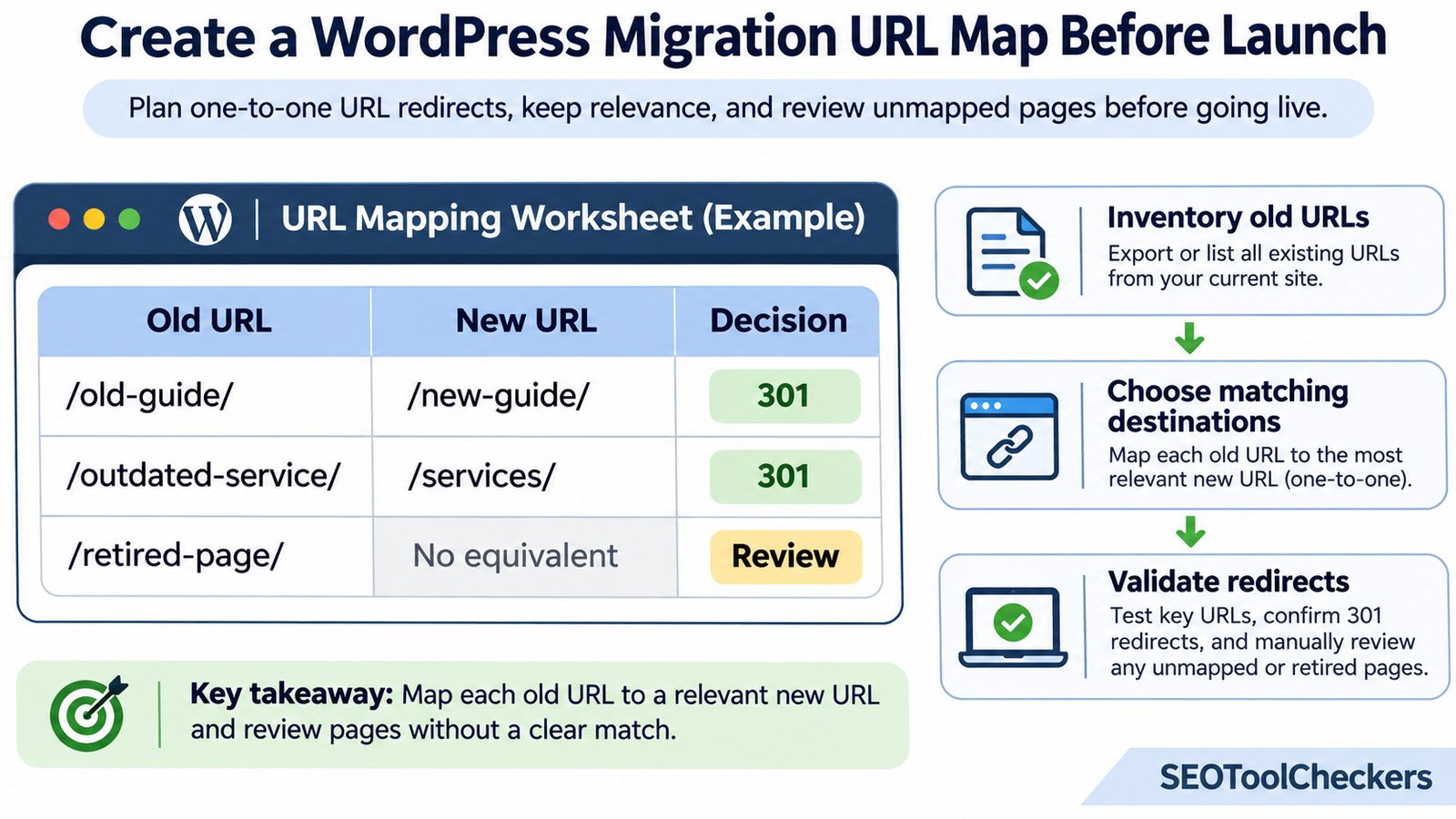
Create a WordPress migration URL map by listing every important old URL, assigning its most relevant destination on the new site, and recording whether it should redirect, remain unchanged, or return a genuine not-found response. Review the decisions before launch, then test that each planned permanent redirect reaches the intended live page without loops or unnecessary hops. The map becomes a shared reference for developers, content editors, and SEO reviewers.
Website Migration URL Mapper
Suggest old-to-new URL matches and export reviewed mappings.
Match old website URLs to new pages
Suggestions use URL paths and page titles; they cannot determine which page is the correct replacement. Review each row, choose or change targets, then export your plan. Nothing is redirected automatically.
Build a WordPress URL Mapping Worksheet That Survives Launch Day
A WordPress migration is not finished when the new theme looks right or the database has been imported. Visitors may still arrive through search results, saved bookmarks, old articles, email campaigns, and links from other websites. If familiar URLs now lead to errors or unrelated pages, the redesign has created a navigation problem.
A migration URL map makes those decisions visible before the new site goes live. It connects old addresses to approved destinations, identifies pages without suitable replacements, and provides a checklist for testing the eventual redirects. Use the Website Migration URL Mapper alongside a shared worksheet so decisions can be checked rather than reconstructed from memory. The examples below use fictional domains and illustrate the planning process; they are not results from a live site.
Decide What the Migration Will Change
Begin by describing the move in one sentence. Are you changing domains, switching from dated post URLs to shorter permalinks, merging categories, replacing an old site with WordPress, or redesigning without changing addresses? The answer determines how much mapping is needed.
If the domain changes but every path stays identical, a carefully tested domain-level redirect rule may cover most pages. If products, posts, category archives, or language folders are being reorganized, a rule based on the hostname alone will miss important exceptions. Record those exceptions individually. A hosting change that preserves all public URLs is a different project and normally does not need a page-by-page redirect map.
Build the Old-URL Inventory From Several Sources
Do not rely on the current XML sitemap alone. A sitemap may omit deleted but linked pages, paginated archives, older landing pages, or addresses that still receive visitors. Combine exports from a site crawl, the WordPress post and page lists, the current sitemap, Search Console performance reports, analytics landing pages, and available backlink data. Server logs or historical redirect lists can reveal additional requests.
- Crawl the current live site. Preserve its URL, status code, canonical, title, and internal-link data as a baseline.
- Export WordPress content. Include posts, pages, custom post types, public taxonomies, and relevant attachment URLs.
- Check traffic and links. Flag old URLs that receive visits, conversions, or useful external links, even when they are absent from navigation.
- Normalize the inventory carefully. Keep a consistent protocol and hostname format, but investigate trailing slashes, query parameters, case differences, and duplicate paths before combining rows.
- Identify existing redirects. Map an old source directly to its final intended destination rather than blindly carrying old chains into the new site.
To collect sitemap addresses, the Sitemap URL Extractor is a related starting point. A crawler and export review are still needed to find URLs a sitemap does not contain.
Give Every Row a Destination, an Owner, and a Decision
A two-column list is useful for simple redirects, but it is weak as a launch-control document. Include the original URL, proposed new URL, action, content relationship, priority, responsible owner, review status, and actual test outcome. Keep the approved mapping separate from a draft suggested by an automated process.
| Worksheet field | Why it belongs in the map | Example entry |
|---|---|---|
| Old URL | Exact address that people and crawlers may request | /blog/old-guide/ |
| Approved target | Final equivalent URL, not an intermediate redirect | /guides/new-guide/ |
| Action | Redirect, retain, consolidate, retire, or investigate | 301 |
| Content match | Reason the destination satisfies the original intent | Updated version of same guide |
| Owner and priority | Person responsible and urgency of review | Content lead / High |
| Test result | Observed post-launch response and final address | Pending until launch |
Keep the canonical full URL in a source column even if the redirect import tool requires paths. This avoids confusion when multiple domains or subdomains are involved. Preserve a versioned master file so the team can distinguish approved decisions from later edits.
Choose Destinations by Page Purpose, Not Similar-Looking Slugs
The strongest match is a page that answers substantially the same need. An old tutorial about changing WordPress permalinks should go to its updated tutorial, not to a generic SEO category simply because both URLs contain the word “WordPress.” Category restructures may allow a category-to-category match, but check whether the new archive actually serves the same subject.
Many old pages may legitimately consolidate into one comprehensive new guide when that guide preserves their useful information. This is different from sending hundreds of unrelated posts to a homepage. When there is no relevant replacement, record a retirement decision and use an appropriate 404 or 410 response rather than inventing a false relationship.
Sample WordPress Migration URL Map
The table below shows illustrative decisions for a fictional site moving from old.example.com to new.example.com. The last two rows require editorial judgment rather than automatic redirect generation.
| Old address | New destination | Planned treatment |
|---|---|---|
old.example.com/blog/seo-basics/ |
new.example.com/guides/seo-basics/ |
301: same guide, improved URL |
old.example.com/tips/image-size/ |
new.example.com/guides/image-optimization/ |
301: relevant content merged |
old.example.com/tips/image-compression/ |
new.example.com/guides/image-optimization/ |
301: second guide merged into same resource |
old.example.com/about-us/ |
new.example.com/about/ |
301: equivalent company page |
old.example.com/expired-offer/ |
No suitable replacement | Review; 404/410 if permanently gone |
A redirect decision should also account for the destination’s content and status. If the target page is not published, returns a server error, or is blocked from indexing when it should be indexable, the mapping is not launch-ready.
Separate Content Decisions From WordPress Redirect Rules
First approve the human-readable map. Then transform only approved redirect rows into the format required by the chosen WordPress plugin, CDN, or web server. A plugin may expect source paths and target URLs, while a server rule may use regular expressions. Never assume every system accepts identical CSV headers or regex syntax.
The WordPress Redirect CSV Validator is relevant when reviewing import files, and the Redirect Format Converter for WordPress Plugins may help with format preparation. Check the destination plugin’s actual import requirements before enabling rules on a production site.
For a domain migration, also review WordPress Address and Site Address settings, media URLs, menu links, serialized database values, and hardcoded domain references. Use a serialization-aware replacement method for database changes. Redirects cannot repair every internal reference or broken image by themselves.
Run a Prelaunch Review Against the Staging Site
Assign each high-priority row to a reviewer. Confirm that the proposed target exists in staging, has the expected title and body content, and uses the intended canonical URL. Compare important pages with the Before-and-After Migration Page Comparison workflow. A matching URL is not enough if the migrated page has lost its primary information.
Before rollout, check the proposed rule set for overlapping patterns, duplicate sources, and accidental self-redirects. Generic regular-expression rules should not override carefully reviewed exceptions. Test in a staging or controlled environment where possible, while remembering that staging authentication and temporary URLs can change what a crawler sees.
Validate Actual Responses Immediately After Launch
The spreadsheet records intent; HTTP requests reveal reality. Take the saved old-URL list and check it against the live environment using the Bulk HTTP Status and Redirect Checker. Evaluate the complete path, not just the first response code.
- Old URLs: expected permanent redirects should usually respond with
301or308and point directly to the approved destination. - Final destinations: pages meant to remain available should normally load successfully, usually with
200, and contain the intended content. - Chains and loops: fix needless extra hops, conflicting rules, repeated protocol switches, and circular redirects.
- Indexing signals: inspect canonicals, robots rules, XML sitemaps, and internal links for references to old addresses.
- Retired URLs: confirm that deliberately removed pages show the response selected in the editorial map.
Repeat checks after caches and CDN rules have propagated. For complex patterns, use the Redirect Rule Tester as another planning aid, but treat live HTTP validation as the decisive check.
Keep the Map After the Website Goes Live
Do not discard the spreadsheet after launch. Add columns for tested date, observed final URL, unexpected status, issue owner, and resolution. Compare server logs and Search Console reporting with the inventory to find requests to addresses that were overlooked. Prioritize fixes for pages with valuable links or frequent visits, then work through the remaining exceptions.
Update internal links and XML sitemaps to point directly at new URLs even though old addresses redirect. Google recommends retaining permanent redirects for at least a year where possible; maintaining useful redirects longer can help people following saved links. Revisit the plan whenever a new permalink change or category consolidation creates another redirect.
Common Questions Before a WordPress Migration
Does every old URL need a 301 redirect?
No. Give URLs with relevant replacements a permanent redirect when the move is permanent. Leave unchanged addresses alone. A truly retired page without an equivalent may return 404 or 410.
Can multiple old articles redirect to one new article?
Yes, if the new article genuinely consolidates the topics and satisfies the earlier search intents. Document why the merge is appropriate rather than using it as a default.
Should I redirect all missing URLs to the homepage?
No. Redirecting unrelated URLs to a generic homepage is misleading and may be treated as a soft 404. Use a meaningful equivalent or an honest not-found response.
Can I import a mapping worksheet directly into WordPress?
Only if its columns and values match the requirements of the specific redirect system. Keep the review worksheet as the source of truth and create a separate import-ready export.
Is a URL map necessary when only the hosting provider changes?
If every public URL remains identical, a redirect map is usually unnecessary. Hosting migration still requires checks for DNS, HTTPS, availability, and site configuration.
For the next step in this WordPress workflow, see how to compare WordPress pages before and after the migration.
You can also repair WordPress media URLs after a domain change.
Reference Guidance
For authoritative migration recommendations, see Google Search Central’s site-move documentation and the WordPress developer guide to migration. Both explain considerations that a redirect worksheet alone cannot solve.