Duplicate URLs With Query Parameters: How to Choose the Canonical
Find declared canonical URLs and possible conflicts.
Which Canonical URL Should You Choose for Duplicate Query Parameters?
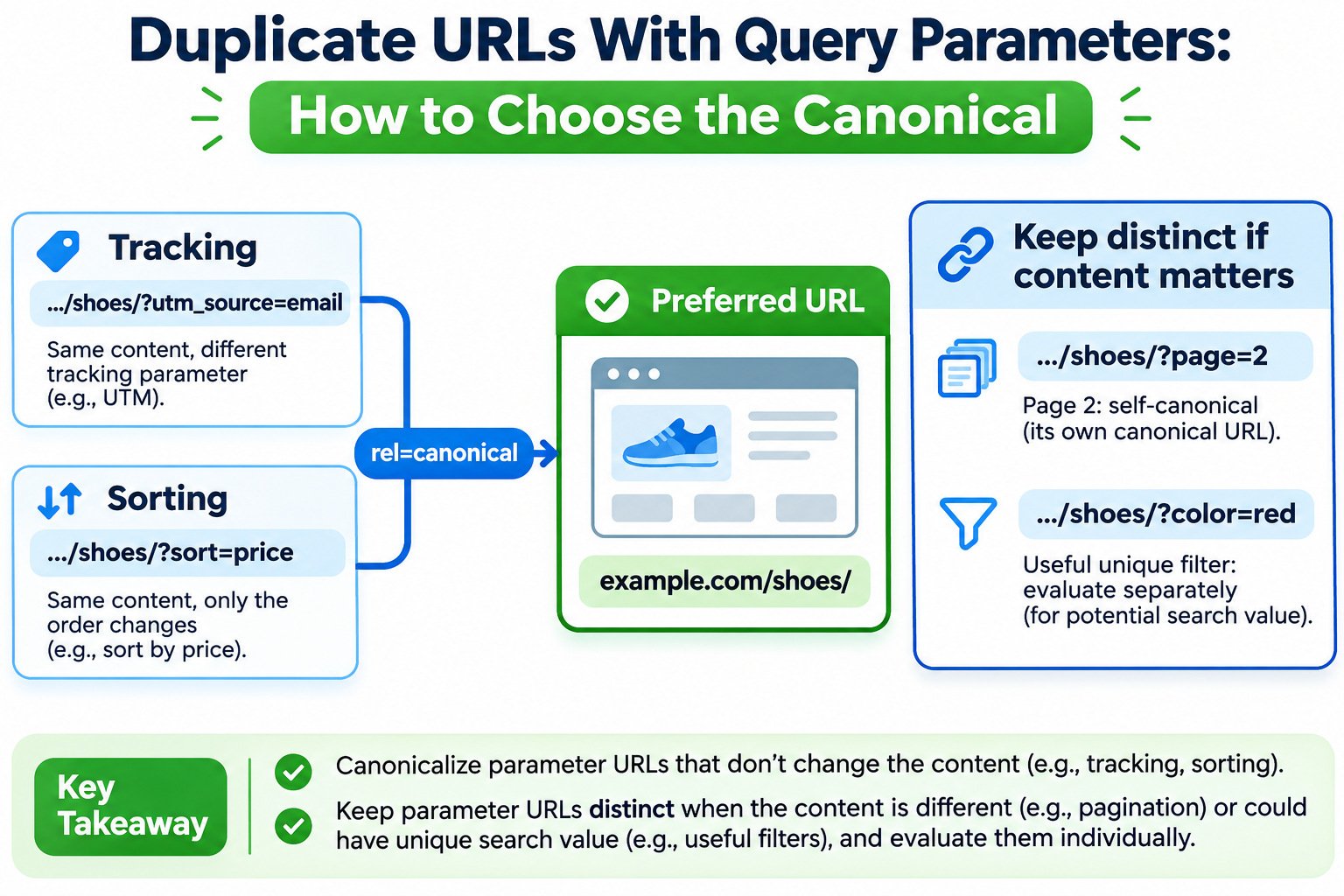
Choose the clean, indexable URL as the canonical when parameters only track visits or rearrange otherwise identical content. A URL such as /shoes/?utm_source=email will normally point to /shoes/. Keep a separate canonical when a parameter identifies genuinely different content, especially page two of a paginated listing. Filtered categories need a case-by-case decision based on their content, usefulness, and search value.
Canonical Tag Checker
Find declared canonical URLs and possible conflicts.
How to Handle Duplicate URLs With Query Parameters
A single product or category page can appear under dozens of addresses: one from an email campaign, another sorted by price, and many more created by filters. The visitor may see nearly identical content even though the URLs look different. Search engines then have to decide which address best represents that content.
The solution is not to delete every query string. A parameter may be disposable tracking data, a useful filter, or the only way to reach the next page of products. First establish what changes in the response. Then pick the canonical and align your internal links, sitemap, and page-level signals with that choice. The examples below use fictional URLs, not results from a live site audit.
Why Query Parameters Create Duplicate URL Problems
A query string begins after ?. Multiple key-value pairs are separated by &. For example, https://example.com/shoes/?sort=price&utm_source=email combines a display preference and a campaign identifier. It is a distinct URL even if the server returns the same products and page copy as /shoes/.
Duplicate content is normal on many websites and is not automatically a search-policy violation. The practical problem is unnecessary crawling, scattered reporting, and uncertainty about which URL should appear in results. Google chooses a representative URL from similar pages; your canonical tag expresses a preference, not an instruction it must obey.
Classify the Parameter Before Choosing a Canonical
Names provide clues, but behavior matters more. Open both the clean URL and the parameterized version. Compare the main content, product selection, page number, canonical element, and HTTP response. Do not decide solely because a URL includes a question mark.
| Parameter example | What it changes | Usually appropriate approach |
|---|---|---|
?utm_source=newsletter |
Attribution, not main content | Canonical to the clean page; preserve campaign measurement as needed. |
?sort=price_asc |
Order of the same items | Usually canonical to the default list. |
?color=red |
Subset of products | Evaluate unique search value and crawl cost; do not generalize. |
?page=2 |
Next set of products or articles | Self-canonical if it is a distinct, indexable pagination page. |
?product_id=482 |
Possibly identifies a different product | Keep a distinct canonical or map to that product’s stable URL. |
?s=running+shoes |
Internal search results | Decide indexability separately; do not blindly canonicalize to the homepage. |
Case 1: Canonicalize Tracking Parameters to the Clean URL
Suppose an article is available as both https://example.com/guides/shoe-sizing/ and https://example.com/guides/shoe-sizing/?utm_campaign=summer. If both display the same article, the preferred canonical is normally the clean URL. This keeps the campaign link usable without asking search engines to index another copy of the article.
The parameterized response should declare the original page in its HTML head:
<link rel="canonical" href="https://example.com/guides/shoe-sizing/">The clean page should also declare itself as canonical. Do not place this element in the WordPress article body: configure it through the site template or SEO plugin so it appears in the document <head>. You can examine a page’s declared URL using the Canonical Tag Checker, then compare the actual responses.
Important: a canonical tag does not remove the tracking parameter from a visitor’s browser or fix attribution errors. Avoid automatic redirects that discard campaign data before it is recorded.
Case 2: Treat Sorting as a Presentation Change
A catalog at /shoes/ might offer /shoes/?sort=price_asc and /shoes/?sort=rating. If the same products appear in a different order, Google generally does not need every sort order indexed. Pointing these variations at the default listing is a reasonable consolidation strategy.
Be careful when sorting and pagination interact. ?sort=price_asc&page=2 may show a different product set from both the default first page and the default second page. Review the resulting content and navigation instead of assigning every URL containing sort to page one mechanically. Users must still be able to browse the chosen order, and crawlers must still be able to discover individual products through stable links.
Case 3: Evaluate Filtered Categories Individually
Filters create the hardest decisions. A category such as /shoes/?color=red can be a disposable view with little distinct value, or it can satisfy a specific search need. A larger site may produce thousands of combinations of size, brand, color, price, and availability. Allowing every combination to be crawled can consume resources without creating useful search pages.
If a filtered page is genuinely useful as a search destination, give it stable navigation, relevant titles, sufficiently differentiated content, and a self-referencing canonical. A clean, descriptive landing page such as /red-running-shoes/ may be preferable when it represents a deliberate category rather than an arbitrary filter state.
If the filtered result is not intended to appear in search, consider consolidating it with a substantially similar parent category, or manage crawling of large faceted URL spaces using deliberate rules. Canonical tags alone may not solve severe crawl-expansion problems. Never canonicalize a valuable, substantially different category to a broad parent simply because it uses parameters.
Case 4: Pagination Usually Needs Its Own Canonical
For an indexable paginated collection, /shoes/?page=2 is not a duplicate of /shoes/ when it contains the next group of products. Google’s pagination guidance recommends a unique URL and self-referencing canonical for each page. Otherwise, treating page two as a copy of page one can create confusing signals and compromise discovery.
<!-- Canonical element in the HTML head of page 2 -->
<link rel="canonical" href="https://example.com/shoes/?page=2">
Ensure each pagination URL returns the correct products, provides crawlable navigation, and has no accidental redirect to page one. The Pagination Link Checker is a related tool to review the page sequence.
A Five-Step Canonical Audit for Parameterized URLs
- Collect examples. Start with URLs found in internal links, server logs, crawl exports, and Search Console. Include a clean page, a tracking variant, a sort order, a filter, and pagination where applicable.
- Compare what visitors actually receive. Record HTTP status, main content, products, canonical annotations, robots directives, and whether JavaScript changes the page.
- Choose the representative URL. Prefer a stable, accessible, indexable address that serves the content you want in search. Preserve distinct pages when they offer separate information.
- Make signals consistent. Use matching canonical tags, clean internal links, and suitable XML sitemap entries. Review redirects and avoid contradictory canonical declarations.
- Check Google’s interpretation. Use URL Inspection in Google Search Console to compare the user-declared canonical with the Google-selected canonical when the information is available. Recheck after Google has had an opportunity to recrawl.
A canonical pointing to a redirect, a 404 page, or an accidentally noindexed destination is a warning sign. Check the destination’s response with the Bulk HTTP Status and Redirect Checker and investigate whether the preferred page is indexable using the Website Indexability Checker.
Canonical Tags, Redirects, Noindex, and Robots.txt Are Not Interchangeable
| Method | Best reason to use it | What to remember |
|---|---|---|
| Canonical tag | Multiple useful URLs have duplicate or very similar content. | A strong preference signal, not guaranteed selection; crawler must access the page to see it. |
| 301 redirect | An obsolete duplicate URL should no longer be served. | Moves the visitor and signals the destination should replace it; risky for active filters. |
noindex |
A page should not be indexed. | Not the preferred technique for consolidating duplicates; Google must crawl it to see the directive. |
robots.txt |
Control crawling of large, unwanted URL patterns. | Cannot reliably remove a known URL from the index or let Google read blocked canonical tags. |
Google’s guidance distinguishes canonicalization from crawl control. For an enormous faceted catalog, selective crawl restrictions may be appropriate, but only after checking that you will not block valuable categories or product discovery. Review potential rules with the Robots.txt Generator and Tester.
Why Google May Choose a Different Canonical
A correct-looking tag is not proof of Google’s final selection. Google can choose a different URL if the nominated pages are not sufficiently similar, the preferred page is less useful or unavailable, internal links favor another version, or canonical signals conflict. The result can also change as Google recrawls the site.
For example, a filter returning 12 red shoes and a category returning 500 mixed-color shoes are not identical views. If the filtered page contains unique material and strong search intent, a tag pointing at the broad category may not achieve the intended result. Inspect both pages rather than repeatedly adding more tags.
Keep your sitemap focused on URLs you want indexed. For a broader technical review, use the XML Sitemap Validator and check that navigation points to preferred destinations.
Common Mistakes That Turn a Small Parameter Issue Into a Large One
- Using the root homepage as the canonical for every filtered or parameterized URL.
- Pointing page two, three, and four of a listing to page one.
- Blocking a URL in robots.txt while expecting Google to discover its canonical element.
- Keeping parameterized duplicates in the sitemap while declaring clean URLs as canonical.
- Adding two different canonical elements through a theme and SEO plugin.
- Removing a parameter that actually identifies a unique product, language, or record.
- Using a 301 redirect that breaks shareable filters or loses campaign attribution.
For safe URL cleanup, the URL Parameter Cleaner can support inspection of parameter patterns. Always confirm which values are essential before changing routing or linking behavior.
Frequently Asked Questions
Should every URL with a question mark point to a clean canonical?
No. A query parameter can identify pagination, a real product, or meaningful filtered content. Judge the resulting page, not the punctuation in its URL.
Are UTM parameters bad for SEO?
No. They are useful for campaign measurement. Problems arise when tracking variants create unnecessary duplicate crawl paths or inconsistent canonical and internal-link signals.
Can a canonical tag stop Google from crawling parameter URLs?
Not immediately. Google must discover and crawl a page to read its canonical element. It may crawl known noncanonical pages less often over time, but canonical tags are not a substitute for crawl management at scale.
Should a filtered category use noindex or a canonical?
It depends on the purpose. Canonicalization is suitable for substantially similar alternatives. Noindex removes a page from search. Robots.txt controls crawling. Decide whether the filter deserves its own search landing page before choosing a directive.
Bottom line: choose canonicals based on content identity and search usefulness. Consolidate tracking duplicates, examine sort and filter behavior, and keep genuine pagination distinct. Then validate the actual URL responses and search engine signals instead of relying on the canonical tag alone.