How to Build a Keyword-to-Page Map for a Growing Website
Map keywords to pages using editable matching suggestions.
What Is a Keyword-to-Page Map?
A keyword-to-page map is a working plan that assigns related search queries to the most appropriate pages on a website. Instead of creating a separate article for every keyword, it groups queries by topic and search intent, identifies a primary URL for each distinct purpose, and records supporting pages. For a growing site, the map helps editors improve existing content, identify genuine gaps, and avoid publishing pages that answer the same question unnecessarily.
Keyword-to-Page Mapping Tool
Map keywords to pages using editable matching suggestions.
Match keywords to website pages
Page suggestions use overlapping words in the page title and URL. Review each match and use the editable page selectors before exporting; this is not a live SERP-based intent test.
Build a Keyword Map That Stays Useful as Your Website Grows
Keyword research tells you what people search for. A keyword-to-page map answers the more important editorial question: which page should satisfy each search? Without that decision, a site can accumulate competing guides, repeated category descriptions, and articles that differ only in their titles.
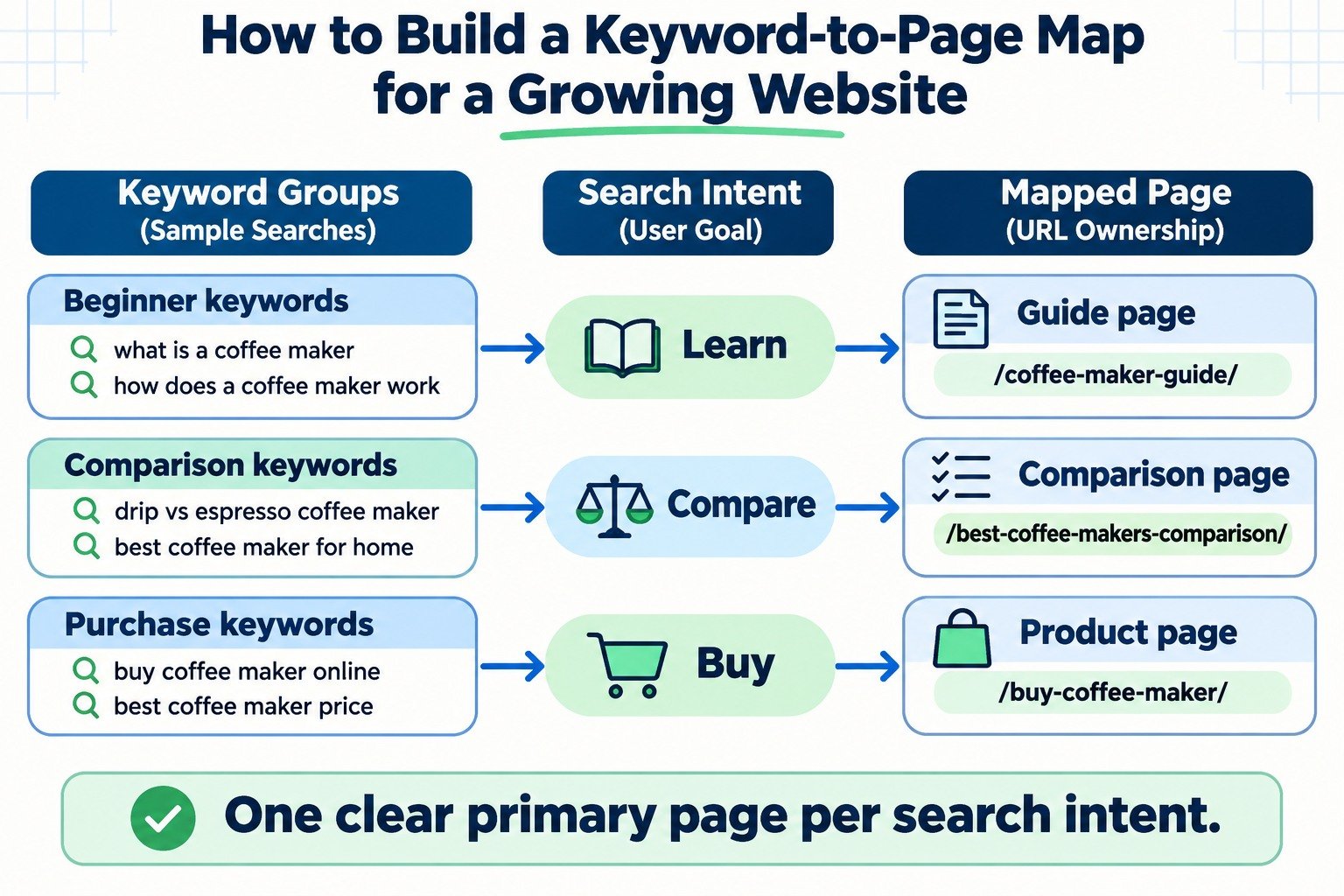
The goal is not to force every search term onto one page. It is to give every distinct search intent a clear owner, while allowing genuinely different pages to support the same broader topic. Start with your current URLs, build sensible keyword groups, and assign a clear next action to each group. The example below uses a fictional coffee-equipment website; the method also works for blogs, service sites, ecommerce stores, and growing WordPress directories.
1. Inventory Existing URLs Before Planning New Posts
Begin with a list of indexable, useful pages you already maintain: homepage, category hubs, product or service pages, buying guides, comparison articles, and tutorials. Record each URL, its current title, its main topic, and whether it is published, planned, being improved, or a candidate for consolidation.
Do not assume a page needs replacing simply because its target keyword is absent from the title. Read the page. It may already answer the query well. Equally, two differently titled posts may repeat the same advice. A content inventory reveals these problems before another article enters the publishing queue.
Exclude routine utility URLs from editorial assignments where appropriate, such as login screens, internal search results, and filtered parameter variations. The map should describe the pages visitors are meant to find, not every URL that a content management system can generate.
2. Gather Queries from Research and Search Console
Use a mix of customer questions, search suggestions, site-search terms, existing article topics, and Google Search Console Performance data. Search Console can reveal queries for which current pages already appear, even when those queries were never in the original content plan.
- Open Search Console, select your website, and go to Performance for Google Search.
- Choose a meaningful date range and inspect the Queries and Pages dimensions.
- Filter by an important page to examine its visible queries, or filter by a query to inspect the pages associated with it.
- Export relevant data and preserve the date range, country, and device filters in your working notes.
Important: the standard Search Console export is not a complete list of every search. Google withholds anonymized queries and applies reporting limits. Treat missing queries as missing evidence, not proof that nobody searches for them. When comparing periods, keep the same settings and avoid interpreting small fluctuations as definite intent changes.
Clean near-duplicates, stray punctuation, and mixed capitalization with the Keyword List Cleaner. For a larger set, the Keyword List Grouper can be a useful starting point for organization. Review every proposed group yourself: phrases containing similar words do not always mean the same thing.
3. Group Keywords by the Job the Searcher Wants Done
Search intent is the purpose behind a query. Common labels include informational, comparison or commercial investigation, transactional, and navigational. These labels help, but the actual desired answer and page format matter more than the label alone.
Consider a fictional site about coffee makers. “How does a coffee maker work?” needs an explanation. “Drip vs espresso machine” needs a comparison. “Buy drip coffee maker online” is better served by a shopping page. Publishing three articles that all try to answer “best coffee maker for beginners” is unlikely to make the site clearer.
Check the search results for representative queries. Look at whether the results emphasize tutorials, product listings, comparisons, local businesses, or a mix. Search results vary by market and over time; use them as evidence, not as a permanent rule.
4. Assign One Primary Owner to Each Distinct Intent
Each keyword group should have one primary URL owner: the page you intend to be the best destination for that intent. Related terms may share that owner when a single well-structured page can satisfy them naturally. Supporting pages should cover narrower, legitimately different questions rather than reword the owner’s main answer.
| Illustrative keyword group | Reader’s goal | Primary URL owner | Editorial action |
|---|---|---|---|
| How coffee makers work; coffee maker basics | Learn the fundamentals | /coffee-maker-guide/ |
Improve existing guide |
| Drip vs espresso machine; espresso versus drip coffee | Compare two methods | /drip-vs-espresso/ |
Create distinct comparison |
| Buy drip coffee maker; drip coffee machines for sale | Shop products | /drip-coffee-makers/ |
Use product category |
| Clean a drip coffee maker; remove coffee-maker scale | Maintain equipment | /clean-drip-coffee-maker/ |
Add supporting tutorial |
These are made-up URLs for a worked example, not pages on SEOToolCheckers.com and not verified search-volume data. Notice how one broad subject supports four legitimate page types without forcing them to compete for an identical purpose.
5. Add the Fields That Make the Map Actionable
A spreadsheet becomes useful when an editor can open it and know what to do next. Keep the fields practical rather than building a complicated scoring system nobody maintains.
| Field | What to record |
|---|---|
| Topic or cluster | The subject shared by closely related queries |
| Primary query and variants | A representative search plus natural alternatives |
| Search intent | The specific task or answer the visitor wants |
| Primary URL owner | The existing or proposed page responsible for the intent |
| Supporting pages | Distinct guides, comparisons, or resources linked to the owner |
| Status and action | Keep, update, create, merge, differentiate, or review |
| Evidence and review date | Search Console window, SERP observations, editor, and last check |
You may also add traffic and impression metrics, difficulty estimates, business value, and an assigned editor. Label estimated values as estimates. A low-volume but highly relevant service query may deserve a page before a popular topic unrelated to what your website offers.
6. Separate Genuine Cannibalization from Healthy Topic Coverage
Two URLs appearing for similar queries do not automatically indicate harmful keyword cannibalization. A category page and a detailed tutorial may both appear for a broad query while answering different needs. The concern is stronger when several pages repeat the same intent and make it unclear which page should be the primary answer.
Look for repeated headings, nearly identical body content, interchangeable search-result snippets, and pages whose keyword sets overlap without offering distinct value. Compare the pages manually and inspect their search performance over a meaningful period. The Keyword Cannibalization Analyzer can support this review, but no automated overlap signal should decide a merge by itself.
If both pages have unique value, differentiate their purpose and connect them with descriptive internal links. If they duplicate the same answer, choose the stronger destination and evaluate consolidation. Use a redirect when a removed URL has a relevant replacement; do not redirect unrelated content merely to preserve a URL.
7. Turn the Mapping Sheet into a Publishing Queue
Use a simple decision rule for every topic group. If a suitable page already exists, improve that page first. If the intent is missing and distinct, create a new page. If two pages duplicate each other, evaluate merging or rewriting them. If the topic is outside the site’s purpose, skip it.
Prioritize by a combination of visitor usefulness, relevance to your business or audience, evidence of demand, content readiness, and the effort required. Avoid publishing a thin page because one extra keyword appears in a research export.
For WordPress, the map can also record the planned post slug, post category, author or owner, internal-link targets, and publication status. Before scheduling a new post, search the map and your live site for near-duplicate topics. This single review step is especially valuable for sites with hundreds of drafts.
8. Build Internal Links Around the Owner and Supporting Pages
Internal links explain how pages relate and help readers move to their next question. A broad guide can link to a comparison, a troubleshooting article, and a shopping category. Those narrower pages can link back to the main guide when background context is useful.
Use anchor text that describes the destination in normal language. Avoid linking every repeated keyword to the same URL or inserting links that interrupt the explanation. For a mapping workflow on SEOToolCheckers, start with the Keyword-to-Page Mapping Tool, organize variants with the Keyword List Grouper, and revisit potential overlap with the cannibalization analyzer.
9. Review the Map When Content or Search Behavior Changes
A map is a living editorial record. Review it after a major site restructuring, a new product line, significant content consolidation, or an unexpected change in important Search Console query/page patterns. For an active publishing site, a monthly editorial check is a reasonable starting cadence, while stable sections may need less attention.
Watch for a new article unintentionally owning an older page’s main intent, outdated slugs remaining in the sheet, a hub that no longer links to its supporting content, or a category page becoming more useful than a generic guide. Update the ownership decision when the evidence changes.
Do not measure success only by whether a keyword ranks. Look at whether visitors reach the right page, whether the page answers the query fully, whether clicks and conversions improve over a meaningful period, and whether the content structure remains understandable.
Common Questions About Keyword-to-Page Mapping
Can one page target several keywords?
Yes. One page can naturally answer several closely related queries that share the same intent. It should not be stretched to satisfy unrelated tasks merely because the words overlap.
Does every keyword need a separate URL?
No. Creating one URL per keyword variation often causes repetitive content. Map groups of related queries to a suitable owner, then create supporting pages only where the searcher’s need is genuinely different.
Should a keyword map include pages that do not rank yet?
Yes. Include existing pages with little search visibility and proposed pages not yet published. The map is a planning and maintenance document, not simply a ranking report.
When should two mapped pages be merged?
Consider merging when both address the same task for the same audience and neither has a defensible separate purpose. Check their content, links, performance, and replacement suitability before changing URLs.
A Practical Rule to Finish With
Map the intent, choose the owner, record the action, and link supporting pages. Do that consistently and your growing website becomes easier to manage, easier to navigate, and less likely to accumulate redundant articles. The spreadsheet matters only because it helps you make better editorial decisions.