JavaScript SEO: What Happens When Important Content Appears Late?
Compare source HTML with a captured rendered DOM.
What Happens When Important Website Content Loads Late?
When a webpage delivers its main text or links only after JavaScript runs, search engines may need to render the page before they can discover that information. Google Search can execute JavaScript and use rendered HTML for indexing, but unsuccessful data requests, blocked resources, and interaction-dependent loading can leave content missing. The safest approach is to make essential information accessible in the initial HTML, then use JavaScript to enhance the experience.
Source vs Rendered HTML Comparison
Compare source HTML with a captured rendered DOM.
Compare server HTML with the browser DOM
Load the public server response or paste source HTML. Then paste the rendered DOM copied from your browser after scripts have run. The comparison is real, but a browser capture is required for JavaScript-rendered pages.
At the target page, open Developer Tools → Console, paste the copied capture code, and paste the resulting HTML into the rendered field below. Review code before running it. This code copies HTML locally; it does not send data to our server.
Diagnosing Late-Loading Content Without Guessing What Google Sees
A product page loads with a spinner. A second later, its description appears. A category page shows only a heading until an API returns its listings. For visitors, these may look like ordinary JavaScript interactions. For search, they raise a more specific question: does the meaningful content become available during rendering, without requiring an action that a crawler will not take?
This guide is about timing, dependencies, and recovery—not a general comparison of source and rendered HTML. You will learn how Google processes JavaScript, why delayed content can disappear from a rendered snapshot, how progressive enhancement reduces the risk, and how to test a real URL. You can apply the workflow to WordPress themes, ecommerce applications, and modern JavaScript frameworks.
Why Google may discover your text after the first crawl
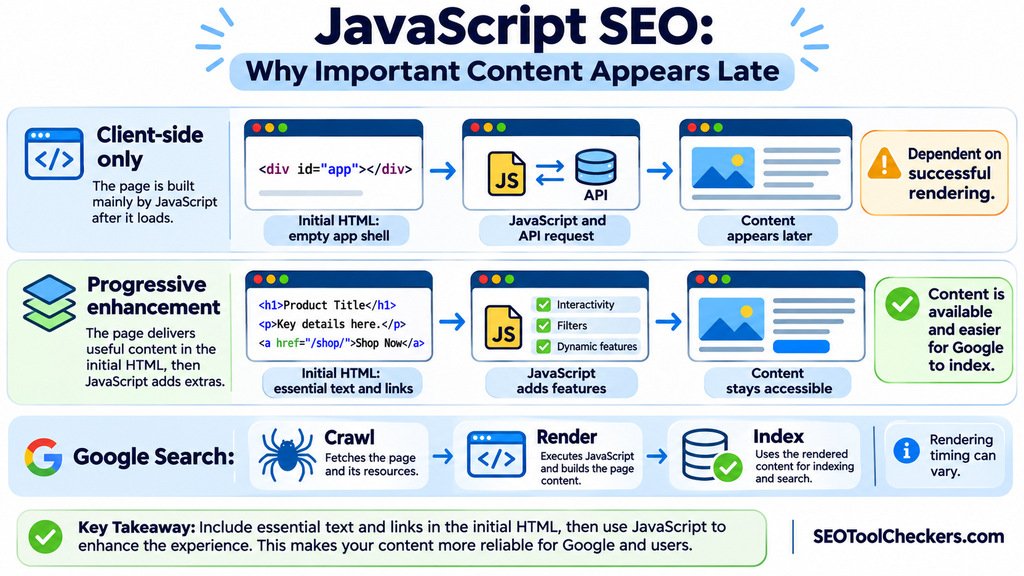
Google Search broadly works through crawling, rendering, and indexing. During crawling, Googlebot requests the page and reads the initial response. It can immediately find ordinary links and any content already present in that HTML. A JavaScript-heavy page may instead return a lightweight application shell with no product details or article body.
Eligible pages are also processed by Google’s rendering system, which uses Chromium to execute JavaScript. The system can then read the rendered document and discover additional text and links. Crawling and rendering are not necessarily simultaneous, however, and there is no universal number of seconds after which Google must stop waiting for every page. Do not build an SEO diagnosis around an invented five-second or ten-second rule.
Late content therefore creates a dependency: the relevant script must load, the data request must succeed, and the content must appear under the rendering conditions Google actually uses. A fast result in your personal browser does not prove that the same sequence succeeded for Google.
The difference between slow content and inaccessible content
Not every delay is an indexing failure. Consider these three patterns:
| Loading pattern | What a crawler receives | Practical concern |
|---|---|---|
| Server-rendered article with later interactive controls | Main copy and links in the initial HTML | Usually a lower content-discovery risk, although performance still matters |
| Client-rendered article inserted after an API response | App shell first; essential text only after a successful render | Content depends on scripts, network responses, and rendering |
| Article content shown only after a click or login | Potentially no relevant text in the crawler-accessible page | Google does not perform user interactions to reveal hidden content |
A slow website and a JavaScript indexing problem are different diagnoses. A page can render successfully but feel slow to users; another can load quickly for you while serving blank content to a crawler. Check evidence from both the HTTP response and the rendered page.
Five late-loading patterns worth auditing
1. An empty app container waits for an API
Some single-page applications respond with an empty <div id="app"> and fetch the real content later. If the API fails, requires an authentication token, or depends on session storage, the rendered page may never contain the intended article or listing.
2. The main copy depends on scrolling or clicking
Lazy loading is useful for images and content below the fold, but essential information must not depend on a person clicking a tab, swiping, or manually scrolling. Google’s lazy-loading guidance recommends making relevant content available when it enters the viewport without requiring these interactions. Provide accessible paginated URLs for large collections that use infinite scroll.
3. JavaScript removes text that the server already provided
Hydration can sometimes overwrite useful server-rendered markup with an empty loading state while the client requests data again. Inspect the live DOM during and after hydration; preserving the initial text is usually better than briefly replacing it with a blank component.
4. Resources are blocked or incompatible
A robots.txt restriction, blocked API, failed cross-origin request, unsupported dependency, or stale cached JavaScript bundle can prevent rendering. Review the browser console and network failures, then check whether the required resources are accessible to Google’s renderer.
5. Mobile pages execute a different content path
A desktop test may succeed while a smaller viewport, different navigation, or mobile-only component omits important text. Google predominantly uses mobile content for indexing. Compare meaningful content and links with the Mobile vs Desktop Content Comparison tool, then check Google’s rendered HTML.
Progressive enhancement: ship the answer first, add features second
Progressive enhancement means starting with meaningful, usable HTML and layering optional JavaScript features onto it. For an ecommerce product, that might mean the name, description, price explanation, and useful links exist before filters or a stock selector become interactive.
The following simplified markup illustrates the principle. It does not require JavaScript to create the essential product text:
<article>
  <h2>Lightweight Hiking Backpack</h2>
  <p>A 24-liter pack with padded straps and a rain cover.</p>
  <a href="/backpacks/">Browse backpacks</a>
  <button type="button" id="compare">Compare options</button>
</article>
<script src="/assets/product-extras.js" defer></script>
Here the description and link remain available even if the enhancement script fails. The comparison button should be hidden or replaced by a functional fallback until JavaScript activates it; otherwise the interface would promise an action it cannot perform. The key is useful default content, not merely visible placeholders.
Server-side rendering, static generation, and suitable prerendering can help deliver that initial HTML. They are architectural options rather than universal requirements. Well-built client-rendered websites can also be indexed, but essential content should not depend on avoidable failures.
How to check whether a delayed paragraph reaches Google
- Choose a unique text sample. Copy eight to twelve consecutive words from the article body or product description. Also note an important internal-link destination.
- Check the first document response. Open View Page Source or the document response in browser DevTools. Search for the exact words and the link’s
href. - Check the browser DOM after loading. Inspect Elements and search for the same sample. If it appears only after JavaScript runs, look for the responsible network request and assess whether it can fail.
- Compare initial and rendered content. Use the Source vs Rendered HTML Comparison tool as a comparison starting point. Confirm which inputs and outputs its live interface supports before drawing conclusions about crawler behavior.
- Test Google’s version. In Google Search Console, use URL Inspection and Test live URL. Examine the rendered HTML and available page resources, screenshot, or console details. Search again for the distinctive sentence.
- Interpret the evidence. If Google can see the sentence in the live rendered HTML, the rendering test succeeded under those conditions. This does not guarantee indexing or prove that Google’s previously indexed copy contains the same text.
Repeat the test signed out and with a fresh browser session. Clearing site storage can reveal dependencies your everyday browsing hides. To investigate whether a missing page is also blocked or excluded, review it with the Website Indexability Checker and use Search Console for Google-specific confirmation.
How to read the results without overdiagnosing
| Observed result | Likely explanation | Next action |
|---|---|---|
| Text in source and Google’s rendered HTML | Essential copy is accessible in both checks | Investigate indexing eligibility separately if the URL is missing from Search |
| Text absent from source but present in Google’s rendered HTML | JavaScript produced the content successfully during testing | Monitor reliability; consider delivering core text earlier |
| Text visible in your browser but absent from Google’s render | Timing, data access, scripts, or environment may differ | Inspect failed resources, authentication, console errors, and mobile behavior |
| Text missing from every version | Publishing or application data may be incomplete | Fix the content source or template before SEO adjustments |
Page renders but has a noindex directive |
Indexing is excluded independently of content loading | Review the initial robots directives; do not rely on JavaScript to remove noindex |
Fixes to prioritize before changing frameworks
- Put core descriptions and links in server-delivered HTML where feasible. Keep JavaScript for filters, comparisons, personalization, and other enhancements.
- Provide reliable data access. Avoid requiring cookies, local storage, or user permissions just to obtain public content. Google’s rendering system does not preserve browser state across page loads like an ordinary returning visitor.
- Correct HTTP and indexing signals. Real missing pages should return appropriate error statuses instead of a blank
200response. An initialnoindextag can prevent Google from proceeding to render. Use the Bulk HTTP Status and Redirect Checker for status investigation and the Robots.txt Generator and Tester for planned crawl rules. - Make internal links crawlable. Use anchor elements with real
hrefdestinations, not click handlers on generic elements. The Internal Links and Anchor Text Analyzer can support a separate internal-link review. - Check hydration and client-side routing. Ensure a second render does not erase essential server markup or return the same generic page for every URL.
- Reduce unnecessary blocking work. Split nonessential scripts, eliminate avoidable API waterfalls, and inspect site performance using the PageSpeed Insights Checker. Faster delivery helps visitors even when Google can render the page.
WordPress and ecommerce examples
On WordPress, a theme may send the full post body as HTML while a booking widget or product filter is added afterward. That is not automatically an indexing problem: determine whether the essential editorial content is already present. Pay closer attention when a page builder injects the entire article through an API, when a script replaces the product description, or when conditional tabs hide information behind a click.
For an ecommerce category page, publish a descriptive heading, concise category introduction, and crawlable product links in the initial response when possible. JavaScript can then sort or filter the results. For a product page, keep key facts accessible regardless of whether review widgets, pricing selectors, or inventory badges successfully initialize.
Do not confuse crawlability with ranking. Even when Google renders content successfully, indexing and search appearance depend on other signals, including eligibility, duplication, and content usefulness.
Questions people ask about late-loading JavaScript content
Does Google wait for all JavaScript to finish?
No fixed waiting period is guaranteed for every script and network dependency. Google renders many JavaScript pages, but you should verify the content in the rendered HTML rather than counting on a particular delay.
Can Google index text inserted with JavaScript?
Yes. Google can use text inserted into the rendered document. The risk is that the insertion might fail or depend on an action the renderer does not perform.
Is client-side rendering automatically bad for SEO?
No. Client-side rendering can work, but it creates dependencies that server-rendered or static core content may avoid. Assess actual rendered output and user experience.
Should important content be lazy-loaded?
Prefer to make essential above-the-fold content available promptly. For content loaded later, follow Google’s lazy-loading guidance so relevant material becomes accessible without user interaction.
Will a successful live test guarantee indexing?
No. Live URL Inspection is a diagnostic snapshot, not an indexing promise or a record of every previous crawl. Check the indexing report separately.
Final check before you call the problem solved
After making a change, capture the initial response, inspect the rendered DOM, and retest with Google’s tools. Confirm that the specific sentence and key links you care about are available. Then verify that the page is indexable, serves a meaningful HTTP status, and works for visitors who receive slower scripts or cannot run them at all.
The principle is simple: deliver the meaning of the page first, and let JavaScript improve the experience rather than supply the only copy of the answer.