WordPress Redirect Loop After Changing Plugins: How to Diagnose It
Convert exact URL redirects to Redirection and Rank Math formats.
How Do You Fix a WordPress Redirect Loop After Changing Plugins?
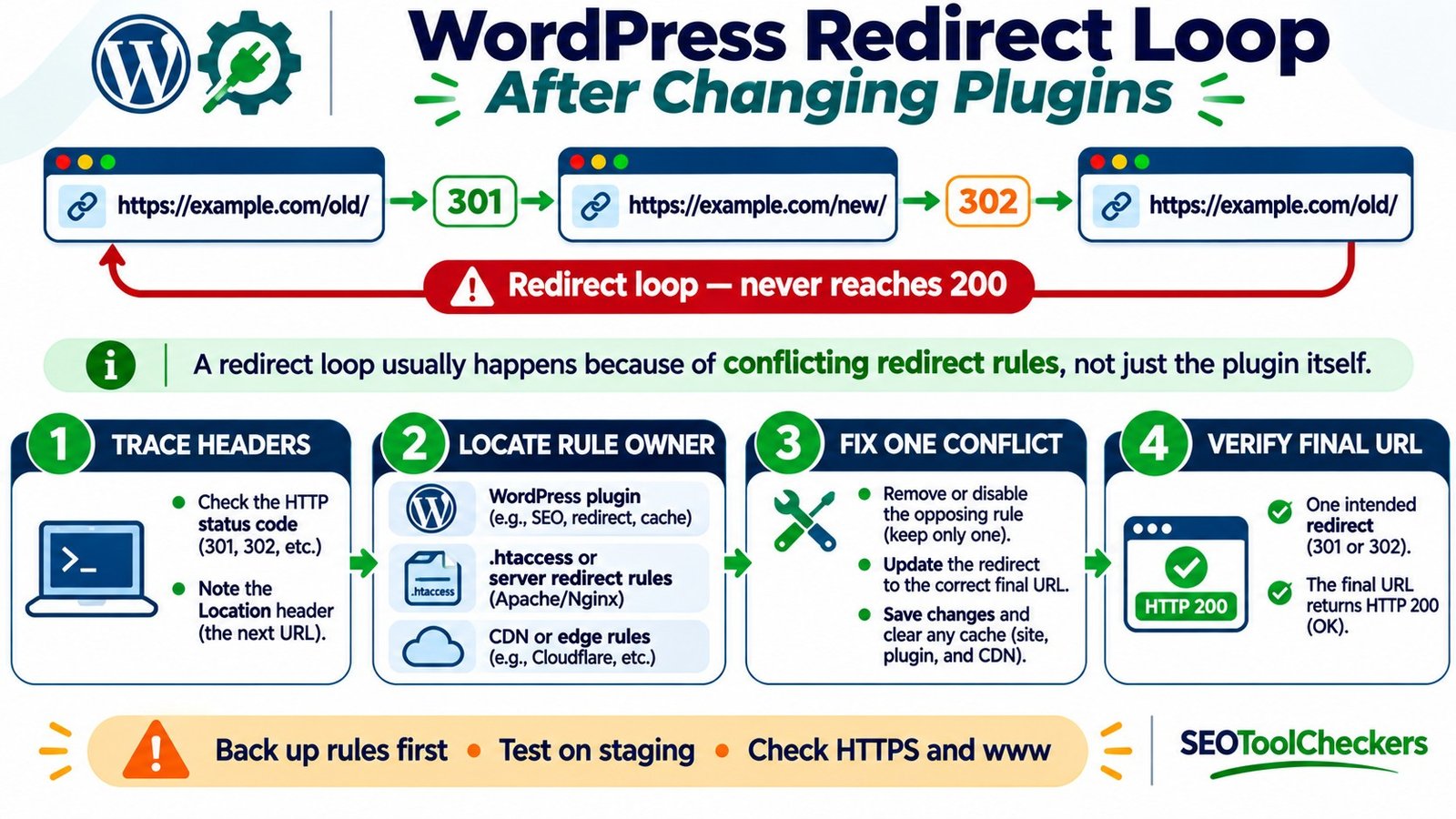
A WordPress redirect loop occurs when one URL redirects to another that eventually sends the visitor back to an earlier URL. After changing a redirect, SEO, security, or caching plugin, inspect each HTTP response and its Location header to identify the conflicting rules. Compare WordPress settings with server and CDN redirects, remove the contradiction, clear relevant caches, and retest until the intended destination loads. Back up redirect rules before editing them.
Redirect Format Converter for WordPress Plugins
Convert exact URL redirects to Redirection and Rank Math formats.
Convert redirect lists for WordPress plugins
Accepts source and destination paths, a 301/302/307 code, and simple exact-match redirects. Imported regex rules are flagged for manual review instead of silently changed.
Redirection CSV uses source URL, target URL, regex, HTTP code, type. Rank Math CSV import requires Rank Math PRO. Check the proposed rules and back up your live redirects before importing.
Trace and Repair Redirect Conflicts Without Breaking WordPress URLs
You install a new redirect plugin, import old URL mappings, and suddenly a page reports ERR_TOO_MANY_REDIRECTS. Perhaps the homepage works but an imported slug does not. Or every HTTPS request bounces back to HTTP. The plugin change is a useful clue, but the failure may involve more than one layer of the website.
Begin with evidence, not mass deletion. The Redirect Format Converter for WordPress Plugins is relevant when moving mappings between plugin formats, but converting a rule list does not establish what a live server actually returns. The diagnostic sequence below separates the redirect path, the rule owner, and the repair. All URLs and response sequences in the examples are illustrative, not live tests of a particular website.
Recognize a Loop Rather Than an Ordinary Redirect Chain
A normal redirect moves an old address to a newer one and eventually returns a usable page, commonly HTTP 200. A loop repeats an earlier location: /old/ sends the visitor to /new/, and /new/ sends the visitor back to /old/. A long chain is not necessarily a loop, but it still causes extra requests and deserves cleanup.
The browser may show “too many redirects,” “page isn’t redirecting properly,” or a blank failure page. In another case, only /wp-admin/ or the login page loops. Scope matters: a single slug suggests a specific mapping, while all pages failing often points to site-wide URL, scheme, proxy, or host rules.
Record Each HTTP Hop Before Changing Anything
Open the problematic URL in a private browser window and note whether it fails only when logged in. Then inspect response headers in your browser’s Network panel or with a command-line client. The Location header on a 3xx response names the next destination.
curl -sS -D - -o /dev/null https://example.com/old/
curl -sS -L -D - -o /dev/null --max-redirs 10 https://example.com/old/
The first command shows the initial response without following it. The second displays headers across followed redirects and stops after the specified limit. Inspect the successive status lines and Location values. A HEAD request can behave differently on some sites, so use a normal GET when the evidence is unclear. Keep the failing path and response sequence for comparison after the fix.
For a larger migration list, the Bulk HTTP Status and Redirect Checker is a related audit destination; its live capabilities have not been independently tested here. The question remains the same for every row: Does the URL reach the intended final page without returning to an earlier hop?
Worked Example: Two Plugins Reverse Each Other’s Rules
Assume an old post was moved from /old-guide/ to /new-guide/. Plugin A contains the correct permanent mapping, but Plugin B has an older reverse rule. The result is:
| Request | Response | Location or outcome | Interpretation |
|---|---|---|---|
https://example.com/old-guide/ |
301 |
/new-guide/ |
Old page points to its replacement |
https://example.com/new-guide/ |
302 |
/old-guide/ |
A second rule reverses the move |
https://example.com/old-guide/ |
301 |
/new-guide/ |
The same URL has returned: loop confirmed |
| After repairing the reverse rule | 200 |
Final /new-guide/ content |
Expected successful destination, to verify live |
The repair is not to redirect both addresses somewhere else. Keep one legitimate /old-guide/ → /new-guide/ mapping, remove the reverse mapping, and confirm the new guide is a real destination. Before importing hundreds of rules, inspect their columns using the WordPress Redirect CSV Validator and compare the pairings with the Website Migration URL Mapper.
Check the Four Places That Can Own a Redirect
| Rule layer | Where to look | Frequent conflict |
|---|---|---|
| WordPress plugins | Redirect, SEO, SSL, caching and security plugin settings | Duplicate mappings or opposite canonical-host choices |
| WordPress URLs | Settings → General; WP_HOME and WP_SITEURL if defined |
HTTP/HTTPS or www mismatch with other layers |
| Origin web server | Apache .htaccess, hosting panel redirects, or Nginx configuration |
A server rule reverses or duplicates a plugin rule |
| CDN / reverse proxy | Cloudflare SSL/TLS mode, edge redirect rules, caching | Edge and origin disagree about HTTP versus HTTPS |
A site’s redirect behavior may combine several layers; not every redirect originates inside WordPress. Apache installations can use .htaccess, but Nginx does not use that file for its redirects. The Htaccess Redirect Generator is useful context for Apache-style rules, while the WordPress Permalink Rule Converter relates to permalink migrations. Neither should be treated as a replacement for checking the actual server configuration.
Test Plugin Conflicts Safely and Keep a Rollback Copy
- Back up first: export plugin mappings and save copies of relevant server files and settings. Confirm you can restore the configuration, preferably on staging.
- Reproduce one failing URL: record the first redirect and every subsequent hop before touching settings.
- Check overlapping redirect plugins: look for identical sources, reverse destinations, regex catchalls, forced trailing slashes, and domain-wide rules.
- Disable one suspected rule: test the failing URL again. If a plugin itself is the suspect, isolate it on staging or during a controlled maintenance window.
- Keep the valid rule: ensure the intended final URL serves its content, not another redirect back to the source.
- Restore anything unrelated: re-enable the rules you ruled out, and document which layer now owns each redirect.
Do not delete a whole redirect database just because one pair is wrong. Plugin deactivation may make other legitimate redirects disappear. If WordPress admin is inaccessible, an administrator can use hosting file access to isolate a plugin, but this affects the running site and should be performed with a recovery plan. Use the Redirect Rule Tester to review candidate mappings and the actual response-header trace to confirm their live effects.
Separate HTTP-to-HTTPS Loops From Page-to-Page Loops
A repeated switch between http://example.com/ and https://example.com/ is a strong sign that protocol policies disagree. For example, Cloudflare’s Flexible encryption connects to the origin over HTTP. If the origin always redirects HTTP to HTTPS, the edge can repeat the request cycle and visitors never arrive.
Review the CDN encryption mode and the origin’s HTTPS configuration together. Where the origin properly supports HTTPS, Cloudflare’s Full or Full (strict) settings may be appropriate, subject to certificate requirements. Do not simply disable HTTPS, certificate checks, or security rules to silence the error. Correct the mismatch at its actual source and retest both HTTP and HTTPS requests.
A separate issue is a hostname ping-pong: a plugin forces www.example.com, while a hosting or CDN rule forces example.com. Decide on one preferred host and have the layers agree. The URL Parameter Cleaner is for reviewing parameterized URLs; it does not resolve protocol or hostname loops.
Investigate WordPress Site Address and Permalink Settings
Under Settings → General, WordPress Address (URL) and Site Address (URL) have specific roles; they may intentionally differ when WordPress is installed in a subdirectory. Compare both with the actual installation and public address before editing. Constants in wp-config.php, if present, can override dashboard fields. A reverse proxy also needs to communicate the original HTTPS scheme correctly.
If redirects began after a permalink change, examine the plugin’s rules and the rewrite configuration before resaving permalinks. Saving permalink settings can help with certain rewrite or 404 problems, but it does not automatically repair a conflict between two redirect destinations. Back up .htaccess before regenerating or editing it. For migration-specific differences, the Before-and-After Migration Page Comparison helps frame the content comparison, while the HTTP trace is still required to verify redirection.
Verify the Fix Across Important URL Variants
After removing the conflict, clear applicable WordPress, hosting, and CDN caches. Repeat the trace on a fresh browser session. Test the old and new URL, HTTP and HTTPS, www and non-www if configured, and an unaffected URL as a control. Check both logged-in and logged-out behavior when the problem involves authentication.
| Test case | Expected outcome | Problem signal |
|---|---|---|
| Old permalink | Permanent redirect to its relevant new page | Redirects back to an old or unrelated page |
| New permalink | Direct successful response, normally 200 |
Unexpected 3xx or 404 |
| HTTP / HTTPS pair | One agreed secure destination | Protocol flips back and forth |
| Host variants | Consistent preferred hostname | www / non-www reversal |
| Admin/login pages | Accessible for authorized users | Repeated login or scheme redirects |
Google recommends directing old URLs to their final equivalents rather than creating avoidable redirect chains. Run a targeted follow-up with the Broken Links Finder and update important internal links to point directly to final destinations. Do not use a redirect to the homepage when an old page has a relevant replacement, and do not assume that a redirect by itself makes a removed page useful.
Common Questions About WordPress Redirect Loops
Can a redirect plugin cause ERR_TOO_MANY_REDIRECTS?
Yes. A plugin may create a direct loop or conflict with an existing host, server, HTTPS, or permalink rule. The timing is a clue; inspect the response chain to confirm the cause.
Should I change every 301 redirect to 302?
No. Either status can participate in a loop. Fix the destination and duplicated rules first; use permanent or temporary redirects according to whether the move itself is permanent.
Does clearing cookies fix a server redirect loop?
Usually not. A clean session may reveal login- or cookie-specific behavior, but repeated server-issued Location responses require server-side configuration work.
Should I remove all plugins or replace .htaccess?
Not as a first step. Preserve a backup, isolate one layer at a time, and test on staging when possible. WordPress’s default rewrite configuration may be appropriate for a particular installation, but blindly overwriting custom rules can break valid redirects.
When a redirect loop follows a bulk import, check the CSV against How to Validate a Redirect CSV Before Importing Into WordPress. Avoid repairing hundreds of rules blindly; the preview-and-rollback principles in Bulk Find and Replace for SEO Content Updates still apply.