Does H1 Heading Structure Affect SEO? A Practical Audit
Review H1–H6 structure and heading level changes.
Does H1 Heading Structure Affect SEO?
H1 heading structure helps explain what a webpage is about, but Google does not require exactly one H1 or a perfect heading sequence to rank. A clear main heading and descriptive H2 and H3 sections make content easier to scan, especially for people using screen readers. Google may also consider prominent headings when generating title links. Audit heading meaning, accessibility, and HTML output rather than treating an H1 count as an automatic SEO score.
Heading Structure Checker
Review H1–H6 structure and heading level changes.
Audit H1 Headings for Clarity, Accessibility, and Search Understanding
A heading audit should tell you whether a visitor can understand the page at a glance. It should not begin with a panic over the number of <h1> tags. Headings are labels for content sections; their words and relationships matter more than chasing a rigid numerical formula. A page can have one H1 and still be confusing because every H2 repeats the same keyword, while a complex layout with an unusual heading sequence may still be readable.
Use this guide to review the headings that actually appear in a page’s HTML, prioritize genuine usability problems, and avoid unnecessary changes to well-performing templates. We’ll use a realistic product-guide example, explain when multiple H1 elements deserve review, and cover how WordPress themes, blocks, and JavaScript can change the final outline. Pair the process with the Heading Structure Checker and verify important findings in your browser.
1. What an H1 Does—and What It Does Not Guarantee
An HTML heading is a structural element, not just a large-font label. The <h1> normally introduces the principal topic of a page or content area. <h2> elements then identify major sections, and <h3> elements name subsections within them. That structure helps readers jump directly to the information they need.
There is no special H1 keyword density, length, or count that guarantees rankings. Google’s SEO guidance explicitly says there is no magical ideal number of headings and that out-of-order headings are not a critical Google Search issue. It also advises well-organized content and descriptive headings because they help people navigate a page. Accessibility guidance is stricter about meaningful nesting, because screen-reader users can navigate heading lists rather than visually scanning the entire page.
Think of the H1 as a clear page label. It should identify the main subject without becoming a keyword list or copying the site name on every page. If the page targets several distinct subjects, that is usually a content-planning problem, not something an extra H1 automatically fixes.
2. Review the Actual Heading Outline, Not Just the Design
Begin by opening the page in a browser and writing down its headings in the order they occur. Do this for a representative article, category archive, product page, and homepage if they use different WordPress templates. A visually attractive page may hide an awkward HTML hierarchy behind CSS styles.
- Identify the main visible topic and confirm that a meaningful heading introduces it.
- List all H1 through H6 elements, including those added by menus, widgets, sidebars, and reusable blocks.
- Check whether each H2 describes a major section and each H3 belongs logically inside an H2 section.
- Flag empty headings, duplicate generic labels, sudden jumps in levels, and headings used only to make text look bigger.
- Compare the outline with the finished page and its real reading order, especially on mobile.
Start with the Heading Structure Checker to inspect heading markup, then manually confirm the important findings. A checker may flag patterns worth reviewing, but it cannot decide whether the copy accurately represents the subject or whether a repeated heading is justified by a complex layout.
3. An Example of a Useful Heading Hierarchy
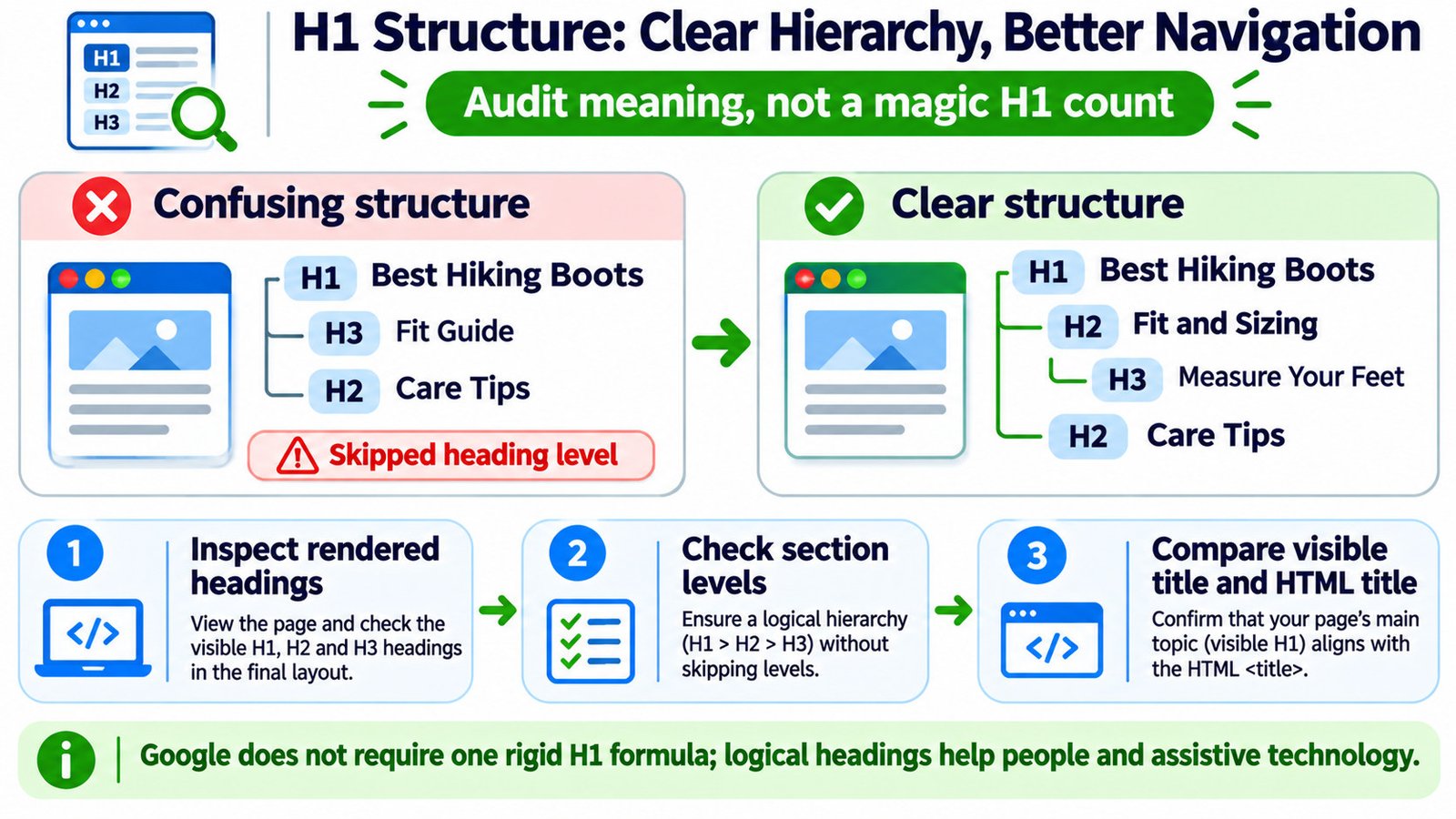
Imagine an article about choosing hiking boots. The first version has an H1, jumps immediately to an H3, and then returns to an H2. The topics are sensible, but the markup implies an odd section relationship. A clearer structure places the fitting subsection under a broader sizing section:
| Less clear outline | More coherent outline | Reason for the change |
|---|---|---|
| H1 — Best Hiking Boots H3 — Fit Guide H2 — Care Tips |
H1 — Best Hiking Boots H2 — Fit and Sizing H3 — Measure Your Feet H2 — Care Tips |
Subtopics follow their parent section, helping users interpret relationships. |
| H2 — Best Hiking Boots for Hiking H2 — Hiking Boots Best Choices |
H2 — Boots for Rocky Trails H2 — Boots for Wet Weather |
Specific section labels are more useful than repeated keyword variations. |
| H2 — Information H2 — More Information |
H2 — Waterproofing Materials H2 — When to Replace Boots |
Descriptive headings let visitors predict what each section contains. |
The same principle applies to services, recipes, troubleshooting guides, and ecommerce categories. Let the subject decide which sections exist; do not manufacture H4 and H5 headings merely to fill out a hierarchy.
4. See the Difference in Real HTML
A clean editorial structure can be short and still be meaningful. In this example, the heading levels reflect actual content sections rather than visual styling:
<main>
  <article>
    <h1>How to Choose Hiking Boots</h1>
    <p>A guide to fit, materials, and trail use.</p>
    <h2>Fit and Sizing</h2>
    <h3>Measure Your Feet</h3>
    <h3>Allow Space for Thick Socks</h3>
    <h2>Traction and Waterproofing</h2>
    <h2>Care and Replacement</h2>
  </article>
</main>
The page’s HTML <title> is a different element, normally located in the document’s <head>. It contributes to search-result title links but is not an on-page heading. Use the Meta Tags Analyzer to review title metadata separately, then compare the main heading and title intent. They may use different wording without being contradictory.
5. Are Multiple H1 Tags a Real SEO Problem?
Multiple H1 elements are not an automatic Google penalty. Older advice often reduced heading audits to a pass/fail rule of exactly one H1. Modern HTML and accessibility guidance is more nuanced. An individual page is usually clearest with a single prominent heading for its main content, but several H1s do not prove the page cannot rank or that its markup is the cause of a traffic drop.
Investigate where the extra headings come from. Is the logo given an H1 on every inner page? Did a WordPress block repeat the article title? Do two equally prominent headings disagree about the page’s main subject? Google’s title-link documentation says conflicting prominent headings can make it harder to identify the main title, and Google may choose wording from elsewhere on the page.
Fix genuine ambiguity and duplicated template output. Do not bulk-replace every additional H1 without checking its role, because a layout or accessibility regression may be worse than the original issue. An audit of when multiple H1s matter is more helpful than declaring every instance an SEO error.
6. Why Skipped Levels Matter More to Navigation Than Rankings
A heading jump such as H2 directly to H4 can make a page harder to understand when navigating by heading levels. The W3C’s accessibility guidance recommends nesting headings by rank and avoiding skips where possible. When you return from an H4 subsection to an H2 section, however, that downward jump in depth is normal: the H2 closes the earlier subsection chain.
Do not add an empty H3 as a cosmetic fix for a missing level. Instead, ask whether the H4 is really a subsection or should be promoted to H3. Similarly, never use an H2 just because it looks smaller than the theme’s H1. If a decorative heading needs different text sizing, change its styling rather than lying about its structural role.
For sitewide page structure, also inspect the HTML Landmark Checker. Headings label topics, while landmarks such as <main>, <nav>, and <footer> identify major regions. These mechanisms complement each other; neither can replace the other.
7. WordPress Issues That Can Change Your H1 Count
WordPress renders more than the text visible in the post editor. The active theme may output the post title as an H1 automatically. If you paste another H1 at the top of the content, the final page may contain two. Page-builder templates, a reusable hero block, and header logo markup can create similar duplication.
- Check the theme template first. On a normal post, inspect whether the published title already appears as an H1 above the content.
- Check the block editor. Keep your first content subsection at H2 when the template already supplies the H1.
- Check homepage templates separately. The site title, hero message, and latest-post section may each use heading markup.
- Check template parts. A sitewide sidebar or menu widget might render the same heading on every URL.
- Check mobile and dynamic states. Some builders output different or duplicated heading nodes for responsive layouts.
Do not change the visible heading level simply because its font looks too large. First identify whether the issue belongs to the theme template, block markup, or CSS. Use a rendered-content comparison with the Source vs Rendered HTML Comparison when JavaScript modifies the page after load. A Mobile vs Desktop Content Comparison is helpful when the desktop and mobile views present different content headings.
8. Heading Text, Search Intent, and Google Title Links
Your main heading should accurately describe what the visitor will find. For example, a page about changing a WordPress URL should not use the H1 “Complete SEO Guide” merely because that phrase sounds broader. A better heading specifies the task; lower headings cover the steps, redirect checks, and common problems.
Google may use the main visual heading, other prominent on-page text, HTML title, and link text to generate a search-result title link. This is a reason to keep the page topic consistent, not a reason to force the H1 and <title> to match character for character. Compare the proposed search appearance with the Google Search Snippet Preview, remembering that the preview cannot dictate Google’s final title.
Repeated keyword-stuffed headings make a guide less helpful. Write labels readers would actually use to find the next section. When linking to a related guide, descriptive anchor wording matters too; inspect vague internal links with the Link Text Checker and evaluate the broader link network using the Internal Links and Anchor Text Analyzer.
9. Prioritize Heading Findings With an Audit Decision Table
| Finding | What to review | Priority |
|---|---|---|
| No clear main heading | Does the visible page present a recognizable primary topic? | High for clarity |
| Duplicate H1 from a template | Is the post title repeated or contradicted by a hero heading? | Medium to high if confusing |
| H2 followed by H4 | Is an H3 section missing, or should the H4 be H3? | Medium for accessibility |
| Several H1 elements | Do they create ambiguity, or reflect an unusual but comprehensible structure? | Case by case |
| Heading used only for font size | Can CSS or a text style preserve the appearance without a fake section? | Medium |
| H1 and SEO title differ | Do they still describe the same page purpose and fulfill search intent? | Case by case |
| Generic or repeated subheadings | Can specific labels make the content easier to scan? | High for usability |
Fix the patterns users can actually experience before spending time on harmless technical warnings. Audit a representative set of templates and then scale the highest-value changes. If all templates share the same defect, a single theme correction may improve hundreds of pages.
10. Verify the Fix Without Claiming a Ranking Boost
After editing, open the published URL rather than relying only on the WordPress preview. Re-run the heading check and inspect the live page in the browser. Confirm that the title still appears visually, headings remain keyboard and screen-reader navigable, and no subsection content was accidentally removed or hidden.
When auditing changes for SEO impact, distinguish what you can verify immediately from what you cannot. You can verify the heading markup and reading order today; you cannot attribute a ranking improvement to an H1 fix without further evidence. Search Console can show longer-term performance trends, but a change in clicks may also reflect queries, seasonality, competition, and other edits.
Record the URL, template type, original issue, edit, and test result. This turns a one-off heading audit into a maintainable editorial standard instead of a repeating bulk-fix project.
Common Questions About H1 Headings and SEO
Does every page need exactly one H1 to rank?
No. Having one clear main H1 is usually a sensible editorial pattern, but Google does not prescribe exactly one H1 as a ranking requirement. Judge the page by subject clarity and the quality of its structure.
Can multiple H1 tags cause a Google penalty?
There is no basis for treating multiple H1 tags alone as a Google penalty. Review whether competing headings make the main title ambiguous or undermine the experience for readers and assistive-technology users.
Should my H1 match my SEO title exactly?
No. They should describe the same page accurately, but the HTML title can include branding or a slightly different phrasing appropriate for search results. Both should remain descriptive.
Does skipping from H2 to H4 hurt rankings?
Google says strict heading order is not a decisive Search requirement. Still, skipped levels can confuse screen-reader navigation, so correct them when they misrepresent the document hierarchy.
Can I use headings in a WordPress sidebar?
Yes, when they genuinely label a region or group of content. Choose the level to fit the page structure and keep repeated template regions consistent; do not use heading tags merely to make sidebar text bold.
Should I add the target keyword to every H2?
No. Natural, specific headings that accurately explain each section are more useful than repeating the same phrase. Use related terminology only when it helps the reader understand the next topic.