
How to Convert Redirect Rules Between WordPress Plugins
Convert exact URL redirects to Redirection and Rank Math formats.
How Do You Convert Redirect Rules Between WordPress Plugins?
To move redirects between WordPress plugins, export the existing rules, map each source URL, destination, HTTP status and matching method to the new plugin’s format, then validate the converted file before importing it. Keep a backup and test representative URLs after import. The file may need more than renamed columns: regular expressions, query parameters and conditional rules can behave differently across plugins, even when the CSV itself is valid.
Redirect Format Converter for WordPress Plugins
Convert exact URL redirects to Redirection and Rank Math formats.
Convert redirect lists for WordPress plugins
Accepts source and destination paths, a 301/302/307 code, and simple exact-match redirects. Imported regex rules are flagged for manual review instead of silently changed.
Redirection CSV uses source URL, target URL, regex, HTTP code, type. Rank Math CSV import requires Rank Math PRO. Check the proposed rules and back up your live redirects before importing.
Move WordPress Redirects Without Breaking Old Links
Switching SEO or redirect plugins often leaves website owners with a spreadsheet that looks straightforward: one column for the old URL and another for the destination. The difficulty is that redirect managers do not all import those columns in the same order or interpret their options identically. A rule that worked yesterday might disappear, match too broadly or create a second hop after migration.
Use the Redirect Format Converter for WordPress Plugins to prepare rules for the destination workflow, then check the resulting fields against that plugin’s current documentation. This guide gives concrete CSV examples for Redirection, Rank Math PRO and Yoast SEO Premium, along with a testing plan for permanent moves, temporary redirects and regex patterns. It also explains which rules deserve manual review instead of automatic conversion.
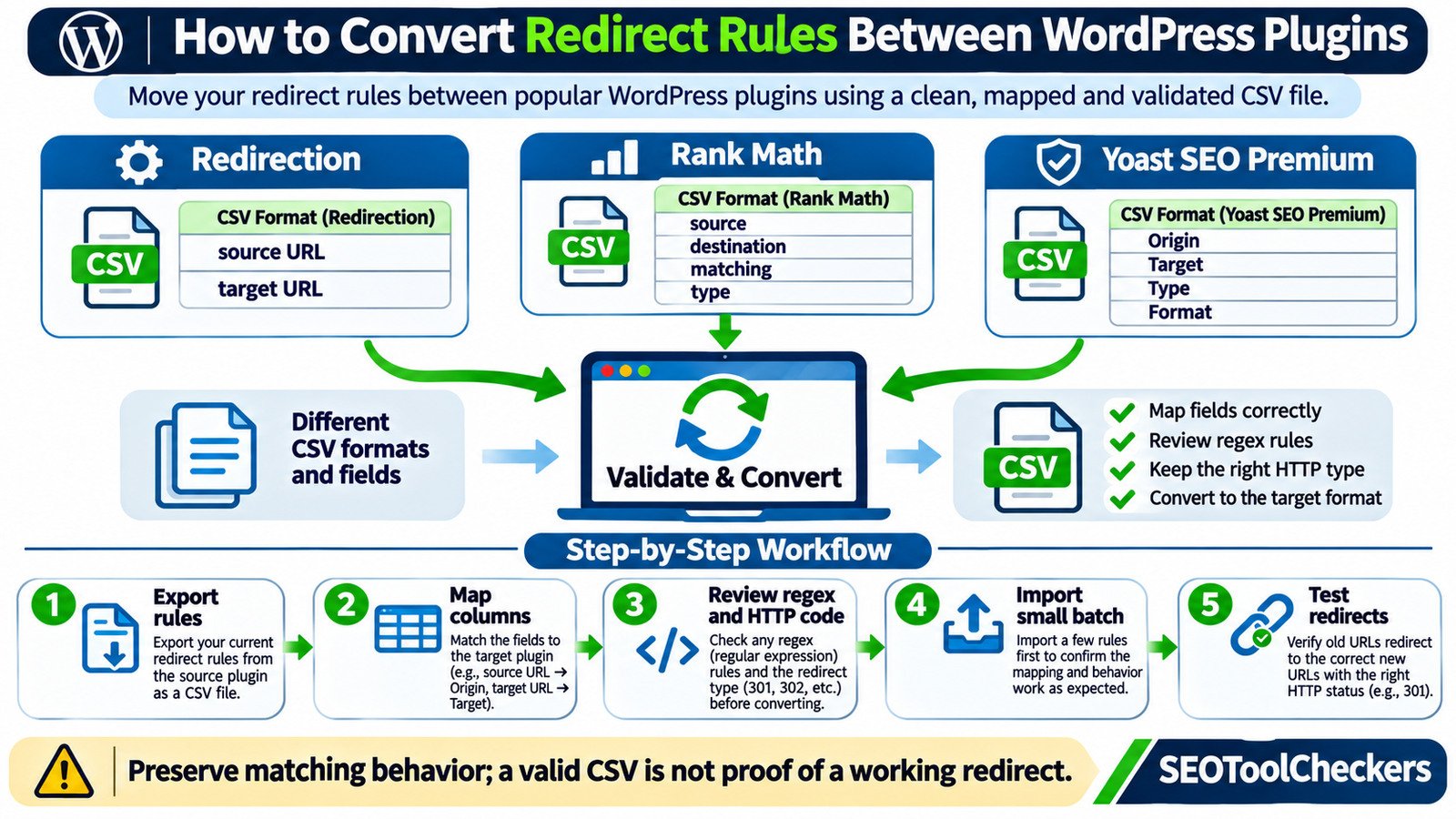
What Must Stay the Same When You Change Redirect Managers?
A redirect is a behavior, not just two URLs. The source path determines what visitors request; the target tells their browsers where to go; the HTTP response explains whether the move is permanent or temporary. A matching option determines which requests trigger the rule. Preserve those four parts before worrying about spreadsheet formatting.
| Rule element | Example | What can go wrong |
|---|---|---|
| Source | /old-guide/ |
A missing slash or altered pattern matches a different URL |
| Destination | /new-guide/ |
An incorrect path sends visitors to a 404 or an irrelevant page |
| HTTP status | 301 or 302 |
A temporary move becomes permanent, or vice versa |
| Match method | Exact path or regex | A rule unexpectedly captures many URLs |
| Additional conditions | Query string, case, login status | The new plugin applies the rule to the wrong requests |
Map old and new addresses before converting anything. The Website Migration URL Mapper helps organize relevant destinations, and the Bulk HTTP Status and Redirect Checker helps reveal whether the currently installed rules return the intended HTTP response.
Know the CSV Format Required by the Destination Plugin
Three well-known WordPress plugins provide useful examples of why one universal redirect CSV cannot be assumed. The formats below are based on each publisher’s documented importer; verify them again for the version installed on your site.
| Destination plugin | Documented CSV layout | Important detail |
|---|---|---|
| Redirection | Source URL, target URL; optional regex flag, HTTP code and type fields | Its basic CSV uses positional fields; JSON can preserve more of its configuration |
| Rank Math PRO | Headers such as source, destination, matching, type, status |
CSV import/export is a PRO feature; matching values have defined names |
| Yoast SEO Premium | Origin,Target,Type,Format |
The exact header, encoding and line-ending requirements matter |
Redirection also offers importers that can read certain other WordPress redirect plugins directly. Yoast SEO Premium similarly supports importing from selected plugins. When a supported direct import is available, compare it with the manual CSV route before performing extra transformations.
Worked Example: Convert Two Simple 301 Redirects
Imagine an existing WordPress site has moved /old-guide/ to /new-guide/ and /old-contact/ to /contact/. Both moves are permanent, and both rules use ordinary path matching rather than regex. The desired visitor behavior is identical regardless of the manager.
Redirection’s compact CSV representation
/old-guide/,/new-guide/
/old-contact/,/contact/
These example records show the source and target positions used by Redirection’s simple format. The format can also carry optional fields; do not invent them when none are needed. Redirection’s JSON export is generally more suitable for retaining its richer rule settings.
Rank Math PRO CSV representation
source,destination,matching,type,status
/old-guide/,/new-guide/,exact,301,active
/old-contact/,/contact/,exact,301,active
Here source and destination are the minimum documented fields needed to create a new Rank Math redirection. Explicitly writing matching, type and status makes this teaching example easier to audit. Use the plugin’s documented accepted values rather than guessing synonyms.
Yoast SEO Premium CSV representation
Origin,Target,Type,Format
/old-guide/,/new-guide/,301,plain
/old-contact/,/contact/,301,plain
Yoast requires that header order, with plain for non-regex rows and regex for regex rows. Its CSV guidance also specifies UTF-8 encoding and Unix line endings. A spreadsheet may display the right cells while exporting an unsuitable file, so inspect the saved CSV in a plain-text editor before uploading it.
These examples are illustrative; no import was performed on your site. Try the WordPress Redirect CSV Validator on a small file first, then compare the actual imported rules with the source list.
A Safe Seven-Step Conversion Workflow
- Export and back up. Download the existing redirect data before editing it. Keep the original CSV or JSON untouched, and back up the WordPress database and plugin configuration.
- Create a rule inventory. Record each source, final destination, status code, match method and exceptional setting. Include whether a rule is active, if the source format exposes that information.
- Choose the target plugin and import method. Review its supported direct importer, file type, required headers and licensing. Do not assume a feature exists in a free edition.
- Map fields deliberately. Convert source and destination without changing their intended URLs. Explicitly map
301,302, exact matches and regex flags where the target supports them. - Validate the converted file. Check column counts, quoting, commas in values, text encoding, duplicate source entries, empty targets and unexpected whitespace. The WordPress Redirect CSV Validator can support this review.
- Import a small sample. Choose representative rules, including one temporary rule if you use them. Confirm the new manager reports the expected entries before importing the full set.
- Test live behavior and remove overlaps. Trace the HTTP status and final
Locationtarget, check for loops and chains, then disable redundant rules in the old plugin only after the replacement is confirmed.
A practical test sample should include a common page, a URL with a query string, a missing trailing slash, and one intentionally nonmatching URL. For dozens or hundreds of rules, the Redirect Rule Tester can assist with evaluating patterns while the Bulk HTTP Status and Redirect Checker checks actual responses.
Handle Regex, Parameters and Conditional Rules Separately
Regex is powerful because one pattern can match many paths, but it creates the greatest risk during conversion. A source such as ^/archive/(.+)/?$ may be intended to capture everything after /archive/. Converting it into an exact match would disable its intended coverage. A careless wildcard can do the opposite and redirect unrelated pages.
Capture groups and replacement tokens must be checked against the destination plugin’s actual regex implementation. Do not assume the same replacement notation or anchoring behavior across import formats. Review regex rules manually, test several matching paths and one path that should remain untouched.
Query parameters also matter. Consider /old-product/?color=blue: a source plugin might require exact query matching, ignore the query, or pass it to the destination. Those are different behaviors even when the source and target path columns are identical. Check the new plugin’s parameter options, or review the query part with the URL Parameter Cleaner before converting rules that depend on it.
Some managers support advanced conditions involving login state, browser agents, cookies or request headers. Two-column CSV cannot reliably preserve all of those conditions. Keep such rules in a manual-review list and reproduce them through supported settings rather than importing a misleading simplified rule.
Choose 301, 302, 307 and Non-Redirect Responses Correctly
Use 301 for an intended permanent move and 302 when the original URL is expected to return. A 307 also expresses a temporary redirect with different request-method semantics. Google generally treats permanent redirects as signals that the destination should become canonical; temporary redirects communicate a different intention.
A 410 Gone is not a redirect to a new URL. Plugins that allow status-only handling may represent 410 differently from source-to-target redirect rows. In particular, Yoast’s documentation requires an empty target for its 410 and 451 CSV records. Do not put your homepage in the destination just to fill an empty cell.
For a larger migration, favor direct redirects to the final relevant destination. Redirect chains add latency, and irrelevant redirects to the homepage may be treated as soft 404s. If the underlying WordPress URL structure has changed, the Htaccess Redirect Generator can help you evaluate server-side rewrite alternatives; implement such rules only after reviewing hosting and plugin ownership.
Pre-Import and Post-Import Checks
| Checkpoint | Good result | Problem to investigate |
|---|---|---|
| Source and target pairs | Each old URL has one intended destination | Unrelated, blank or duplicated targets |
| Plugin import preview | Expected row count and values | Skipped rows, missing headers or changed fields |
| Permanent moved page | 301 to the final relevant page | 302, loop, chain or wrong destination |
| Temporary landing page | Expected temporary code and destination | Unexpected permanent response |
| Regex and parameters | Only intended requests match | Unexpected matches or lost parameters |
| Final destination | Usable page with appropriate response | 404, login wall, unrelated page or noindex surprise |
Also audit internal links. Redirects protect visitors using old URLs, but navigation and editorial links should point to current destinations whenever possible. The Internal Links and Anchor Text Analyzer can help identify internal paths that still depend on avoidable redirect hops.
Why an Imported Redirect File May Still Fail
The CSV imports zero rows. Check exact header names, field count, separators, encoding and access to the correct import feature. An import button can reject a structurally sound spreadsheet because its schema is wrong for that plugin.
The rules appear in WordPress but do not trigger. Confirm the new plugin is enabled, the matching type is preserved and no server or CDN rule is taking precedence. A redirect configured on the new WordPress domain cannot necessarily handle requests that still reach an old domain on a different server.
Visitors see a loop. Inspect the full response chain. Two plugins, a forced HTTPS rule and a server rewrite may each redirect the same URL. Identify which layer owns the rule rather than adding a third redirect.
Uppercase or slash variations fail. Check case sensitivity and trailing-slash settings. Some managers expose global defaults as well as rule-specific options. A CSV that lacks those settings does not prove they were recreated.
A batch creates duplicates. Inspect how the destination plugin handles existing entries. For example, Redirection offers duplicate-handling options, and Rank Math uses IDs when editing existing rules through CSV. Keep the source export and an import log so you can roll back unintended changes.
Questions Website Owners Ask During Redirect Migration
Can I move redirects from Redirection to Rank Math?
Yes, but choose between a supported importer and a file conversion based on the plugins and editions installed. Rank Math PRO supports CSV import; its columns and matching values differ from Redirection’s simple CSV. Test the converted rules before retiring the old setup.
Does converting CSV redirects also change WordPress permalinks?
No. Converting redirect records changes the format used to describe routing behavior; it does not itself rename posts, change their slugs or alter WordPress permalink settings.
Should old URLs always redirect to the homepage?
No. Give each old page a genuinely relevant successor when one exists. If content is permanently gone without a suitable replacement, evaluate the appropriate not-found or gone response instead of forcing an irrelevant destination.
Will the new plugin preserve click counts and redirect logs?
Not necessarily. Basic CSV files usually describe rules rather than all operational history. Redirection documents JSON as a richer export option. Back up statistics and logs separately if they matter to your reporting.
Can I leave both redirect plugins enabled?
A short, controlled overlap may be useful while testing, but duplicate active rules can produce conflicting behavior. Establish which system will own redirects, verify representative requests and remove duplicate handlers deliberately.
Sources and Further Reading
- Redirection — Import and export formats
- Redirection — URL matching and query parameters
- Rank Math — Creating and editing redirects with CSV
- Yoast SEO Premium — Importing redirects
- Google Search Central — Redirect types
- Google Search Central — Site moves with URL changes
For the next step in this WordPress workflow, see how to plan old-to-new URL destinations.
You can also resolve custom post type permalink issues.