
Custom Post Type Permalinks Not Working in WordPress
Build redirect rules for common permalink structure changes.
Why Are Custom Post Type Permalinks Not Working in WordPress?
Custom post type permalinks may return 404 errors when WordPress has outdated rewrite rules, the post type is registered with unsuitable URL settings, or another page or taxonomy uses the same path. Server routing or an inactive registration plugin can also break access. First check whether the problem affects individual entries, the archive, or both. Then refresh Settings → Permalinks once and investigate any remaining registration or slug conflict.
WordPress Permalink Rule Converter
Build redirect rules for common permalink structure changes.
Convert simple WordPress permalink structures to redirect rules
Supports WordPress date, category, author, post ID and post-name tokens used as complete path segments. Generates Apache, Nginx and Redirection-plugin examples. The converter rejects unsupported or potentially looping patterns; check all server rules in staging before using them.
Repairing Custom Post Type URLs Without Losing Content
A WordPress custom post type, or CPT, lets a site organize content such as books, properties, courses, or product reviews outside ordinary posts and pages. Each public entry may have its own permalink. A separate listing, called a post type archive, exists only when its registration enables one. That distinction matters when troubleshooting a 404.
A custom post type’s content can still be present in the WordPress database even if its public URL no longer resolves. Fixing the route is usually better than creating redirects to unrelated pages. This guide moves from quick checks to registration and server diagnosis, then shows how to validate old and new URLs before treating the repair as complete.
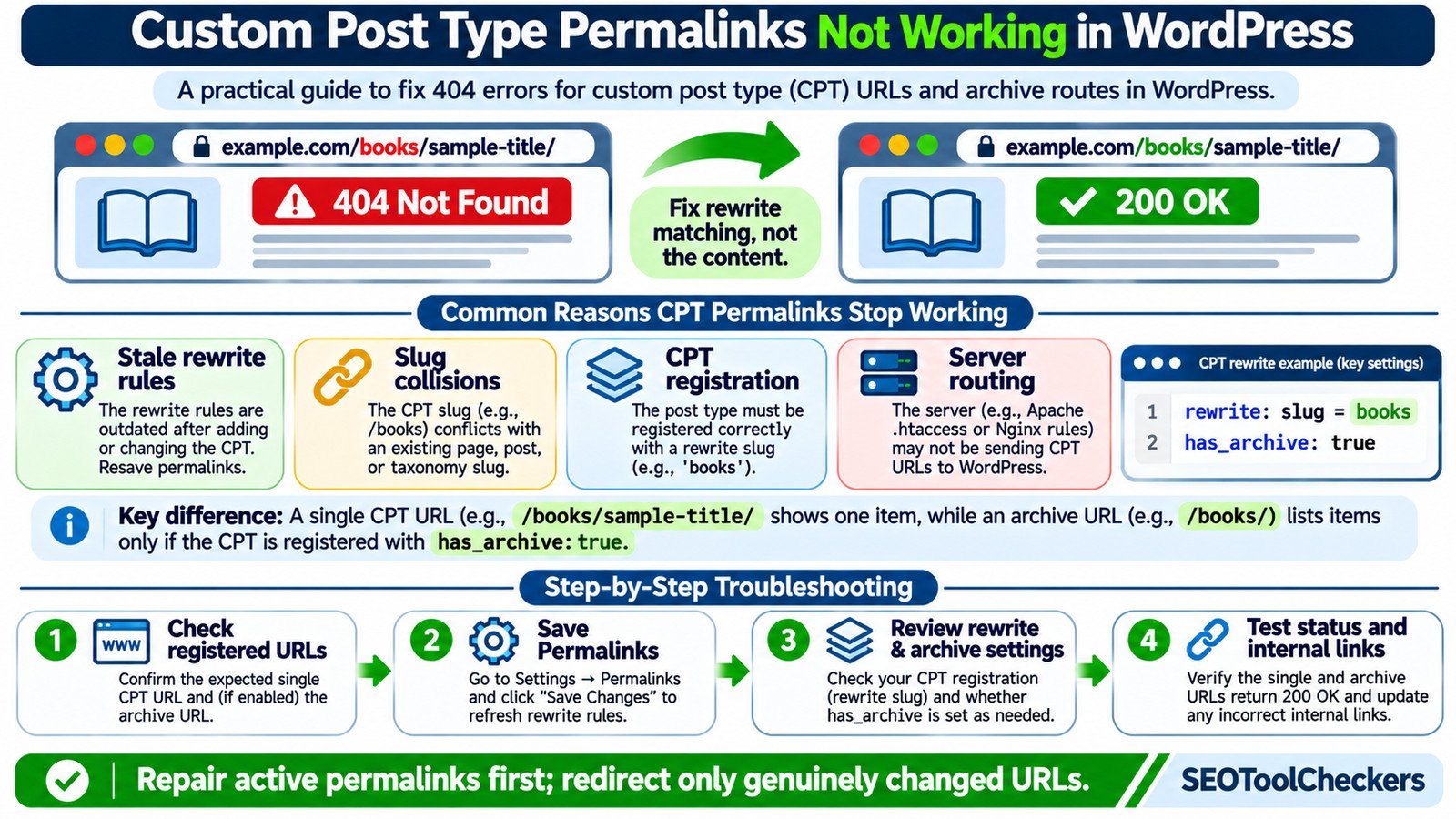
Find Out Whether the Single Page, Archive, or Both Are Broken
Start with one published CPT entry and its expected archive URL. Suppose the post type is registered as stc_book with a public URL slug of books. A single entry may appear at https://example.com/books/sample-title/. Its archive may appear at https://example.com/books/, but only if that archive has been enabled.
Open the Edit screen for an existing entry and copy the permalink WordPress actually provides. Do not construct a URL solely by reading the post type’s menu label. Test the copied address alongside the archive address and ordinary posts.
| Observed symptom | Likely investigation | First action |
|---|---|---|
| Every CPT single URL returns 404 | Stale rewrites, registration, or path collision | Confirm CPT loads; refresh permalinks |
| Single items work, archive is 404 | has_archive disabled or archive slug differs |
Inspect registration and archive setting |
| Only one item fails | Unpublished entry, incorrect slug, or a conflict | Check that item’s status and permalink |
| All pretty WordPress URLs fail | Broader Apache, Nginx, or hosting routing issue | Test a normal post and server rewrite config |
| Old CPT URL fails but new URL works | Intentional slug change without mapping | Evaluate a relevant permanent redirect |
| Unexpected 301 or redirect loop | Plugin, web server, or CDN redirect rule | Trace individual HTTP responses |
Check the actual response with the Bulk HTTP Status and Redirect Checker. An HTTP 404, a 200 page that merely displays “not found,” and a redirect ending in a 404 require different fixes.
1. Make Sure WordPress Is Registering the Post Type
Custom post types are added by code, often in a plugin or a theme. If the plugin was disabled or theme code was removed, an old entry may remain in the database while WordPress no longer recognizes its post type on public requests. Re-enable the responsible component only after confirming it is safe and compatible with the current site.
For a known existing CPT, check that its admin menu still appears and that a representative item is Published, not a draft or in the trash. Review the plugin settings or the code that calls register_post_type(). WordPress recommends placing content-type registration in a plugin rather than making it dependent on the active theme.
Developers should also look for a post type identifier collision. A generic identifier such as product may be used by another component; the post type key and the URL slug are separate values. Avoid renaming the identifier without a migration plan, because stored posts reference it.
2. Refresh Permalink Rules Once, Then Recheck
- Record the current permalink structure and take a current backup, especially on production sites.
- Open WordPress Dashboard → Settings → Permalinks.
- Click Save Changes without changing the chosen structure unless you have a separate reason to change it.
- Open the same CPT single URL and archive URL, and check their HTTP responses again.
Saving permalink settings normally regenerates WordPress’s rewrite rules, which can become stale after registering or updating a post type. This is a useful initial repair, not proof that every CPT should have an archive. If it does not solve the problem, keep the existing permalink scheme intact and proceed to inspect the CPT registration.
WordPress provides flush_rewrite_rules() for developers. Because regenerating rules is relatively expensive, it should run on appropriate activation or configuration-change events, not on every page load. Calling it repeatedly on init is not an acceptable permanent fix.
3. Check the Settings That Actually Control CPT URLs
For code-managed post types, these register_post_type() arguments determine which URLs WordPress can register. If a plugin owns the type, adjust it through supported plugin options instead of editing vendor files that updates can overwrite.
| Registration argument | What to verify | Possible symptom |
|---|---|---|
rewrite |
Enabled and contains the intended slug |
Expected pretty permalink is absent |
has_archive |
true or a valid custom archive slug when an archive is needed |
Archive URL returns 404 while singles work |
public and publicly_queryable |
Match the desired front-end visibility | Public requests are not queryable |
with_front within rewrite |
Whether the site’s permalink front prefix should be included | Generated path differs from the expected one |
query_var |
Whether the intended front-end query behavior is supported | Some query-based access patterns differ |
Do not confuse show_in_rest with permalink registration. It enables REST API exposure and is commonly needed for block-editor support, but does not fix an incorrect rewrite slug or disabled archive.
Example: A WordPress CPT With Singles and an Archive
The following illustrative PHP snippet registers a public post type with /books/ as its URL prefix. It is an educational example, not a drop-in fix for an unknown production post type.
add_action( 'init', function () {
    register_post_type( 'stc_book', array(
        'label'        => 'Books',
        'public'       => true,
        'has_archive'  => true,
        'show_in_rest' => true,
        'rewrite'      => array(
            'slug'       => 'books',
            'with_front' => false,
        ),
    ) );
} );
With a published entry whose slug is sample-title, the intended single URL is /books/sample-title/; the archive is /books/. Set has_archive to false, and WordPress will not create that post type archive through this registration. Likewise, changing the rewrite slug requires updating the rules and, where existing published URLs change, evaluating redirects.
Use the WordPress Permalink Rule Converter to document proposed permalink patterns. It is not a substitute for confirming WordPress’s registered rules or server configuration.
4. Look for Collisions With Pages, Taxonomies, and Other Plugins
Imagine that the CPT expects /books/, but an ordinary WordPress page also uses books. Or a taxonomy, another custom post type, or a rewrite plugin claims a matching path. The URL cannot reliably express two different destinations without explicit routing logic, and rule precedence may determine which request is served.
Compare the CPT’s rewrite.slug and has_archive with page slugs, taxonomy bases, other CPTs, and plugin-created rules. Make changes on staging when possible. If the problem began after enabling a plugin or switching themes, test the relevant component deliberately and document what changes.
A temporary diagnostic is to choose a clearly unique test slug for the CPT on staging, save permalink settings, and check whether its URLs start resolving. That suggests a collision but does not by itself identify which conflicting rule must be fixed. The Redirect Rule Tester can help review candidate redirect patterns; redirects should not be used to conceal unresolved URL ownership conflicts.
5. Separate WordPress Rewrite Problems From Web Server Failures
If ordinary posts and pages also fail under readable URLs, investigate server routing. Apache commonly uses .htaccess and rewrite support; Nginx typically uses server-level request routing to pass unresolved paths to WordPress. Reverse proxies and hosting redirects may introduce additional behavior.
If only CPT paths fail but ordinary post permalinks work, WordPress’s CPT registration, rewrite settings, or slug conflicts are usually a more focused starting point than rewriting the entire server configuration. Avoid pasting generic .htaccess rules into an Nginx deployment or replacing existing production rules without a backup.
The Htaccess Redirect Generator can be useful when preparing Apache-specific redirects for genuinely changed paths, but it does not diagnose Nginx configuration or automatically repair custom post type registration.
Worked URL Map: Repair, Redirect, or Leave Missing?
Consider an example site that changes the public CPT slug from library to books. The following addresses are illustrations, not live-test results.
| URL | Intended state | Recommended action |
|---|---|---|
/books/sample-title/ |
New published single entry | Repair rewrite matching so this returns 200 |
/books/ |
New archive, if has_archive enabled |
Check listing template and response |
/library/sample-title/ |
Old published single permalink | 301 to the matching /books/ entry URL |
/library/ |
Old archive URL | 301 to /books/ if the new archive exists and matches |
/books/nonexistent/ |
No corresponding published item | A genuine 404 may be appropriate |
The decision rule is simple: repair the current address if it should work; redirect an old address only if it genuinely moved. The Website Migration URL Mapper can help plan specific old-to-new mappings. Do not redirect all failed CPT paths to the homepage, because unrelated destinations can confuse visitors and search engines.
Validate the Fix Across SEO and Site Navigation
Once the registration or routing issue is resolved, review a small but representative set: a published single item, the archive (if enabled), a paginated archive when it exists, one old permalink, and a deliberately invalid path. Check that working content returns 200, old moved URLs return an appropriate permanent redirect, and missing content stays missing.
- Use the Broken Links Finder to locate references to obsolete CPT addresses.
- Use the Internal Links and Anchor Text Analyzer to review menus, contextual links, and navigation paths.
- Inspect preferred canonicals and robots instructions where relevant. The Website Indexability Checker can support that review, but a 200 response alone does not guarantee indexing.
- Check whether your XML sitemap includes the intended public CPT URLs, using the XML Sitemap Validator for structural checks.
If many URLs changed, update internal links to their final destinations rather than relying on chains of redirects. Monitor Search Console after deployment for new crawl issues. Never consider a fix complete based only on what the WordPress editor displays.
Frequently Asked Questions
Why do CPT singles work but the archive returns 404?
has_archive may be disabled or use a different archive slug. A working single URL does not imply that an archive exists. Confirm registration settings before treating the archive as broken.
Will saving WordPress permalinks delete custom post type entries?
No. Saving permalink settings refreshes rewrite handling and does not delete stored entries. Back up the site before making broader changes to plugins, slugs, or server rules.
Why did CPT URLs break after changing a theme?
If the old theme registered the post type, switching themes can remove the active registration. Restore the registration through a maintained plugin or other supported approach; avoid relying on theme code for portable content types.
Does changing the post type’s rewrite slug automatically create redirects?
No. WordPress can generate different current permalinks after a rewrite change, but old URLs are not guaranteed to redirect. Map genuinely moved pages to their corresponding new destinations and test each response.
Is a noindex tag responsible for a CPT returning HTTP 404?
No. noindex provides search indexing instructions and does not normally change a valid page’s HTTP response into 404. Check the route and the indexing directive as separate concerns.
Official Sources and Further Technical Reading
- WordPress Plugin Handbook — Registering Custom Post Types
- WordPress Developer Resources — register_post_type()
- WordPress Developer Resources — flush_rewrite_rules()
- WordPress — Settings Permalinks screen
- WordPress — Common Errors
- Google Search Central — Site Moves and Redirects
For the next step in this WordPress workflow, see how to troubleshoot WordPress category archive 404 errors.
You can also move redirect rules safely between plugins.