Noindex vs Robots.txt: Which One Stops Google from Indexing a Page?
Does Noindex or Robots.txt Stop Google from Indexing a Page?
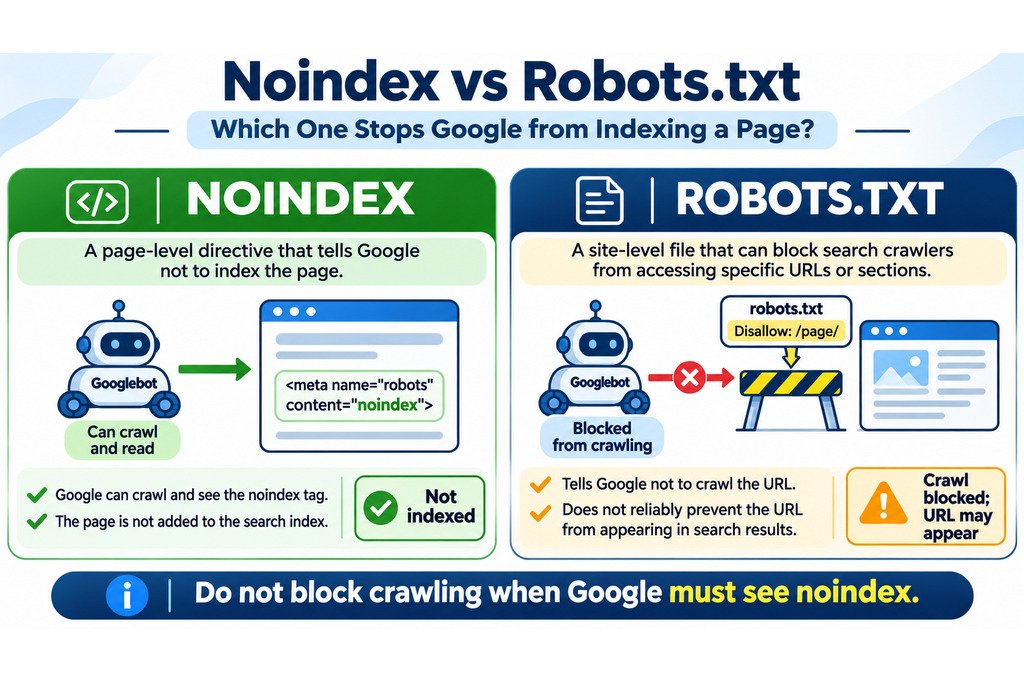
Use noindex when you want a public page excluded from Google Search. The directive tells Google not to index the page after its crawler accesses the HTML or HTTP response header. A robots.txt Disallow rule instead tells compliant crawlers not to fetch a URL. It does not reliably prevent that URL from appearing in search results. Crucially, if robots.txt blocks the page, Google may never see its noindex instruction.
Choosing Between Indexing Control and Crawl Control
A page can be accessible to visitors, crawlable by Googlebot, and still excluded from Google’s index. Those are three separate conditions. Confusing them leads to mistakes: public pages vanish from search, test environments appear as bare URLs, and editors spend days requesting indexing for pages they intentionally marked noindex.
Before changing a rule, decide what you actually want. Should Google visit this URL? Should it show the page in results? Or should the content be accessible only to authorized people? Different goals require different controls.
Noindex vs Robots.txt at a Glance
| Question | Noindex | Robots.txt Disallow |
|---|---|---|
| Main purpose | Exclude a page or resource from search results after the rule is discovered. | Tell compliant crawlers not to request specified URLs. |
| Can Googlebot crawl? | Yes, it must be able to access the rule. | No, for matching disallowed URLs. |
| Can the URL appear in Google Search? | Not after Google processes a valid noindex rule. | Yes. Google may list a known URL without crawling its content. |
| Where is it configured? | HTML robots meta tag or X-Robots-Tag HTTP header. |
/robots.txt at the site’s origin. |
| Works for PDFs? | Yes, using an HTTP X-Robots-Tag header. |
Can prevent PDF crawling, but is not a reliable search-removal method. |
| Protects private data? | No. | No. |
How the Noindex Directive Works
A noindex directive is an instruction for search engines that support it. When Googlebot successfully requests the page and reads the directive, Google can exclude that URL from its search index. This remains true even if other websites link to it.
For an ordinary HTML page, the usual implementation is a robots meta tag in the document’s <head>:
<meta name="robots" content="noindex">Use name="googlebot" if you want the rule to apply specifically to Google’s crawler rather than all supporting search engines. Google also supports a noindex instruction in an HTTP response header:
X-Robots-Tag: noindexThe header option is particularly useful for PDF documents and other non-HTML files that have no HTML head. You do not need both forms for the same URL. Choose an implementation that your server or CMS consistently delivers.
Do not confuse noindex with nofollow. Noindex concerns whether the current URL is included in results; nofollow concerns how links on that page are treated. They are separate directives and should not be combined by habit.
What Robots.txt Actually Prevents
The robots.txt file sits at the root of an origin, such as https://example.com/robots.txt. Its rules communicate which paths a named crawler should avoid fetching. This is useful for reducing unwanted crawling of repetitive URL spaces or nonessential resources.
For example, the following is an illustrative rule that asks compliant crawlers not to fetch URLs under /internal-reports/:
User-agent: *
Disallow: /internal-reports/
The rule is not a password. Anyone can visit an unprotected URL directly, other crawlers may ignore the instructions, and a blocked address may still appear in Google if discovered through links. Never place confidential documents online and assume a robots.txt rule makes them private.
Before publishing changes, review your paths with the Robots.txt Generator and Tester. Use its output as a drafting aid, then confirm Google’s actual interpretation through Search Console and the live robots.txt file. Do not assume a locally generated rule has been deployed.
The Dangerous Combination: Disallow and Noindex on the Same URL
Imagine a WordPress page at https://example.com/old-offer/. The page contains <meta name="robots" content="noindex">, but the robots.txt file also says:
User-agent: *
Disallow: /old-offer/
Googlebot sees the crawl restriction first. Because it cannot fetch the page, it may never discover the noindex tag. The URL can remain known to Google through external or internal links and, in some cases, still appear in search without a normal content snippet.
Correct approach for a public URL you want removed: allow crawling, serve the noindex directive, and give Google an opportunity to fetch and process it. Do not immediately block the same URL with robots.txt.
Also avoid placing Noindex: /old-offer/ inside robots.txt. Google explicitly does not support noindex as a robots.txt instruction. A correct meta tag or HTTP header is required.
Which Method Should You Use in Common SEO Situations?
| Situation | Recommended approach | Why |
|---|---|---|
| Public thank-you page or limited-value HTML page | Allow crawling and use noindex. | Google can read the exclusion directive. |
| Unimportant, repetitive crawl paths | Consider selective robots.txt disallow. | Can reduce crawling of URL spaces you do not need fetched. |
| Private staging site, customer records, or confidential files | Authentication or access control. | Neither robots.txt nor noindex secures content. |
| PDF intended to remain public but absent from search | X-Robots-Tag: noindex on its HTTP response. | PDFs cannot carry an HTML robots meta tag. |
| Duplicate URLs with one useful preferred version | Consider canonicalization and consistent internal links. | Consolidates duplicate signals; it serves a different purpose from noindex. |
| Page permanently deleted with no replacement | Serve 404 or 410, as appropriate. | Signals the resource no longer exists. |
| Obsolete page moved to a suitable replacement | Use a relevant 301 redirect. | Directs people and crawlers to the replacement, not a generic homepage. |
For a removed page that is already in search, Google Search Console’s Removals tool can provide temporary suppression while you implement the permanent change. A temporary removal request is not itself a lasting noindex policy.
How to Set Noindex Correctly in WordPress
If your WordPress website uses an SEO plugin such as Rank Math, set noindex on the specific post, page, or archive you intend to exclude. The exact menu labels depend on the installed version and configuration.
- Open the specific post or page in the WordPress editor.
- Find the SEO plugin’s advanced robots settings.
- Select Noindex for that URL, while leaving normal crawling available.
- Save or update the page, then view the actual rendered HTML source to confirm the robots meta tag.
- Check the live HTTP response for an unexpected
X-Robots-Tagrule as well. - Confirm the URL is not blocked by an overlapping robots.txt rule.
- Exclude deliberately noindexed pages from XML sitemaps intended to list indexable canonical URLs.
Site-wide caution: the WordPress Settings → Reading → Discourage search engines from indexing this site checkbox is a broad setting, not a page-specific solution. WordPress can output a site-wide robots meta directive when it is enabled. Check this setting after staging-to-live migrations to avoid unintentionally suppressing an entire production site.
Use the Website Indexability Checker to support your technical review, but verify the actual page output and Google’s view separately. An outside checker cannot confirm Google’s eventual indexing decision.
Check the Result in Google Search Console
After publishing changes, inspect the exact URL in Google Search Console. The status of the last indexed version and the result of a live test can differ, so pay attention to which evidence you are reading.
- Use URL Inspection for the full URL, including the intended protocol and hostname.
- Review the reported crawl allowance and indexing signals for the inspected version.
- Run Test Live URL when you need to check the current accessible state.
- For a desired noindex, confirm that Googlebot can fetch the URL and the noindex rule is present.
- For an indexable page, check that neither the robots meta tag nor HTTP headers accidentally say noindex.
- When appropriate, request indexing or wait for recrawling, then monitor the Page indexing report.
A live test is a diagnostic snapshot, not a guarantee about when Google’s index changes. If a page was recently blocked or unblocked, Search Console’s historical data may lag behind current server output.
Also use the XML Sitemap Validator to review sitemap structure. Sitemap inclusion is a discovery signal, not an override for noindex or robots.txt rules.
When a removed URL redirects or returns an unexpected error, check its response with the Bulk HTTP Status and Redirect Checker before treating it as a robots directive problem.
When a Canonical Tag Is Better Than Noindex
Suppose two product URLs show essentially the same item with different sorting or tracking parameters. You may want Google to recognize the preferred version rather than exclude both pages. A canonical link communicates that preference, while noindex tells Google to omit the particular URL.
Google treats canonical tags as signals, not absolute commands. A URL with a self-referencing canonical can still be excluded because of noindex, and noindex is not the recommended general substitute for canonicalization. Review duplicate-page intent with the Canonical Tag Checker.
Do not add noindex to every duplicate automatically. Choose one useful canonical destination, use consistent internal URLs, and apply the indexing rules that match the page’s purpose.
Frequently Asked Questions
Does noindex prevent Googlebot from crawling?
No. Google needs to crawl and read the tag or HTTP header for the directive to work. A URL can be crawlable while remaining excluded from the index.
Can I use noindex and robots.txt Disallow together?
That is usually a mistake for the same URL. Disallow prevents crawling, so Google may never discover the noindex directive. Choose the control based on whether your goal is crawl management or exclusion from search.
Is noindex the same as hiding a webpage from visitors?
No. People with the URL can still open a public noindexed page. Sensitive information needs authentication or another genuine access-control mechanism.
How long does it take for Google to process noindex?
There is no fixed processing deadline. Google must be able to revisit the URL and process the directive; status updates may appear later in Search Console.
The Bottom Line
Choose noindex to exclude an accessible page from Google Search. Choose robots.txt to manage crawler access. Neither method makes private content secure. For WordPress, check the site’s global visibility setting, per-page SEO options, actual HTML or headers, and Google Search Console before assuming a rule has worked. Most importantly, do not block the crawl that Google needs in order to read your noindex instruction.