When Should a Page Use a Self-Referencing Canonical Tag?
When Should a Page Have a Self-Referencing Canonical?
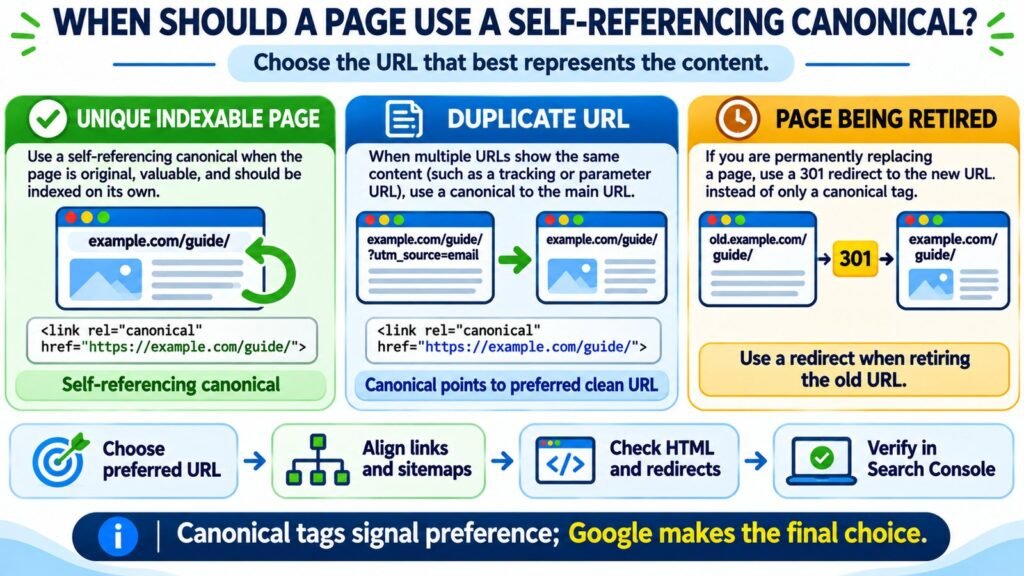
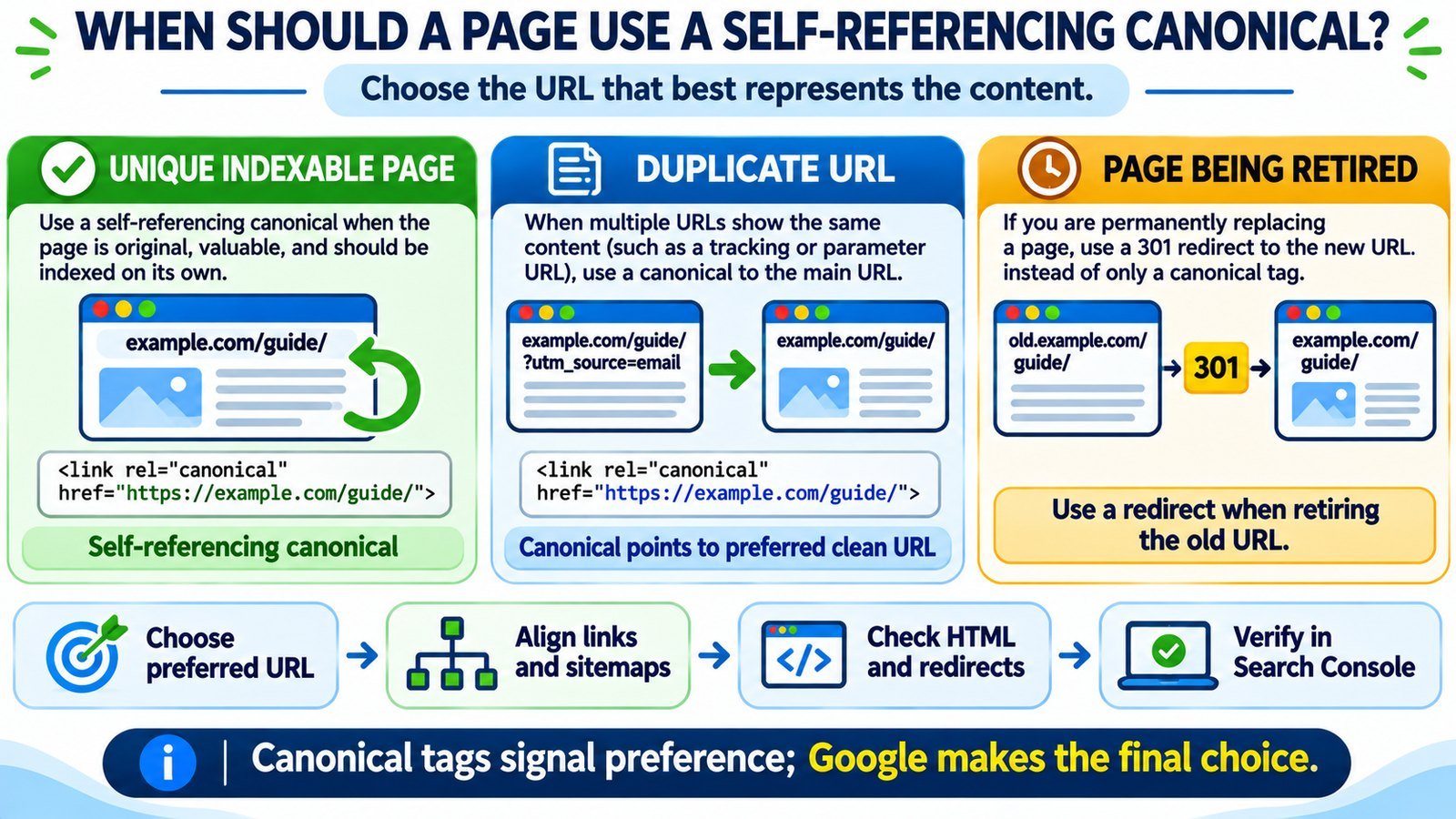
Use a self-referencing canonical tag when a page is the preferred, independently useful version of its content and you want that URL considered for indexing. The tag points back to the page’s own address, helping clarify which version should represent it when tracking parameters, alternate paths, or other duplicates exist. Google recommends this practice on canonical pages, but it is not mandatory and does not guarantee Google will select or index the URL.
Choose the Representative URL Before Adding Canonical Tags
Most websites have more than one way to reach the same content. A WordPress tutorial might load at its normal permalink, with an email-tracking parameter, or through an old URL that still resolves. A canonical tag helps search engines understand which address you prefer as the representative version. The trick is choosing the right page first.
Self-referencing does not mean that every accessible URL should nominate itself. An original tutorial may sensibly point to itself, while a near-identical parameter URL should usually point to the clean tutorial. An outdated URL that is being permanently retired may need a 301 redirect instead. Before changing anything, inspect the existing preference with the Canonical Tag Checker and compare it with the role the page actually serves.
1. What a Self-Referencing Canonical Tag Actually Says
A self-referencing canonical is an HTML rel="canonical" element whose destination is the page’s own preferred URL. Suppose your guide is published at https://example.com/wordpress-seo/. Its canonical element may look like this:
<link rel="canonical" href="https://example.com/wordpress-seo/">The tag belongs in the document’s <head>, not in the visible WordPress post content. It identifies a preferred representative; it is not a command to index the page, a replacement for a redirect, or proof that Google has chosen the same canonical. Google considers this a strong signal alongside redirects, internal links, sitemap references, and the pages’ content.
Google can often choose an appropriate canonical without a tag at all. The benefit of a self-reference is consistency: your preferred page explicitly agrees with the URLs you use in navigation and sitemaps.
2. Pages That Usually Deserve Their Own Canonical
A self-reference makes sense when a page is intended to stand on its own and you are confident its address is the one visitors should use. Common examples include:
- An original blog post: A complete article with a distinct topic should generally identify its stable permalink rather than the category archive or homepage.
- A service or landing page: A genuinely separate service page can point to itself, even if it shares the site’s header and footer with other pages.
- A valuable category archive: A category with its own relevant product or article listing can be its own representative URL when you intend it to appear in search.
- A distinct product page: A product that has meaningful standalone content may use a self-reference. Whether color or size variants need separate canonicals depends on how those variants are presented and indexed.
- A paginated series page: When page two contains its own portion of a series or list and no suitable view-all canonical exists, it can have its own canonical rather than automatically pointing to page one.
The shared test is whether this specific URL represents content worth preserving separately. Before troubleshooting canonicals, check whether the target page is accessible and intended to be indexable using the Website Indexability Checker. Technical eligibility and Google’s actual indexing decision are separate questions.
3. When a Different Canonical or a Redirect Makes More Sense
Some URLs exist only as variations of a preferred page. Giving each variation its own self-referencing canonical can send mixed messages about what should appear in search.
| Page situation | Typical preferred approach | Reason |
|---|---|---|
| Unique, indexable article at its final URL | Self-referencing canonical | It is the preferred representative |
Same article with ?utm_source=email |
Canonical to the clean article URL | The parameter does not make new main content |
| Old article URL permanently replaced | 301 redirect to the new URL | The old address should no longer serve separately |
| Identical page accessible at HTTP and HTTPS | Prefer HTTPS; use consistent redirects and canonicals | Avoid competing protocol versions |
| Two genuinely different tutorials | Normally each has its own canonical | Different content merits separate representation |
| Filtered results with substantially different content | Evaluate individually | Some filters are duplicates; others serve distinct intent |
| Page intentionally excluded from search | Review its noindex policy, not just its canonical |
A canonical is not an index-exclusion directive |
Consider a simple example: https://example.com/guide/?utm_campaign=spring displays the same guide as https://example.com/guide/. The clean guide may self-reference; the tracking variant can point to that same clean address. But if /guide-2027/ contains a substantially new annual edition, canonicalizing it to the older guide could undermine its separate identity.
For permanently retired addresses, inspect the actual redirect chain with the Bulk HTTP Status and Redirect Checker. A canonical tag on an old, still-accessible page does not itself send the visitor to the replacement.
4. A Practical Method for Choosing the Canonical URL
Do not decide based only on which URL is shorter. Choose the address that is stable, user-friendly, accessible, and best represents the actual content.
- List the real URL variants. Include tracking parameters, trailing-slash differences, HTTP/HTTPS, old slugs, and alternate hostnames where applicable.
- Compare the main content. Determine whether the pages are truly equivalent or answer different questions. Similar templates alone do not make pages duplicates.
- Pick one preferred representative. Prefer the final HTTPS address that your website actually uses and that returns the intended content successfully.
- Match the signal to the situation. Use a self-reference on the preferred page, another-page canonical on accessible duplicates, and a redirect when an old URL should be retired.
- Make supporting signals consistent. Point internal links and sitemaps toward preferred URLs and avoid declarations that conflict with redirects.
- Verify Google’s eventual selection. Use the indexed URL Inspection result in Search Console after Google has processed the page; do not mistake a live test for its final choice.
For a large website, the decisions also affect discovery. A navigation menu linking repeatedly to obsolete or parameterized URLs can weaken the clarity of your preferred URL structure. Review navigation and article links with the Internal Links and Anchor Text Analyzer; then check whether the sitemap references only the intended canonical pages using the XML Sitemap Validator.
5. Set or Confirm Self-Referencing Canonicals in WordPress
If your website uses Rank Math, you often do not need to fill the canonical field manually. Rank Math normally uses the current post or page URL as its default canonical. A custom value is most useful when a page intentionally points elsewhere.
- Open a published WordPress post or page and confirm its final permalink under the editor.
- Open Rank Math SEO → Advanced. If the Advanced tab is unavailable, check whether Rank Math’s Advanced Mode is enabled.
- Inspect the Canonical URL field. A blank custom field may be normal when the plugin is generating the default self-reference.
- Remove an accidental override pointing to an old slug, homepage, or unrelated page, or enter an intentional absolute preferred URL when appropriate.
- Save the post, clear page and CDN caches if present, and view the public page’s HTML source. Confirm the final canonical tag, not merely the editor setting.
Other SEO plugins, including Yoast SEO, have their own canonical controls. Do not run multiple systems that output competing canonical tags. Also avoid inserting <link rel="canonical"> into a WordPress paragraph block: it needs to be managed in the HTML head or an appropriate HTTP response header.
6. Watch for These Canonical Misconfigurations
Common mistakes are often easier to spot in the page source than in a dashboard screenshot. When a canonical looks suspicious, check the following:
| Problem | Why it matters | What to check |
|---|---|---|
| Every page points to the homepage | Distinct pages no longer state their own preference | Theme, template, and SEO plugin settings |
| Canonical points to an old redirecting URL | Canonical and server signals disagree | Final redirect destination and page source |
| Duplicate canonical elements | Multiple signals create ambiguity | Plugins, themes, injected code |
| Wrong protocol, hostname, or path | The declared URL differs from the preferred live address | HTTPS, www preference, slash, permalink |
| JavaScript changes the tag after load | Source and rendered metadata may differ | Rendered DOM and original HTML source |
Page is blocked or marked noindex |
A self-reference alone cannot make it indexable | Crawl access, robots directives, response |
If a canonical appears correct in view-source but changes after scripts execute, compare the original response with the rendered page. The Source vs Rendered HTML Comparison is a useful supporting check where rendering changes are suspected. Google recommends making canonical information clear in the initial HTML whenever possible.
7. Verify the Result in Google Search Console
Search Console lets you distinguish what your website says from what Google has chosen. Inspect the exact URL and review the user-declared canonical and Google-selected canonical in the indexed Page indexing information. Those values may differ without indicating a problem.
If the inspected URL is a tracking variant, Google selecting the clean original may be the desired outcome. If a unique, valuable page is grouped with an unrelated article, compare the two pages’ primary content and inspect redirects, canonical markup, and internal linking signals. Google can override your declared preference when other evidence points elsewhere.
After correcting a real conflict, verify the currently served HTML and let Google recrawl the page. URL Inspection’s live test cannot predict Google’s eventual canonical choice. Avoid repeatedly requesting indexing when the current issue is that two URLs still look substantially alike.
Frequently Asked Questions About Self-Referencing Canonicals
Does every WordPress page need a self-referencing canonical tag?
No. Google can select a canonical without your input. Self-referencing tags are recommended on preferred pages, but duplicate variants, retired URLs, and intentionally excluded pages need decisions based on their actual purpose.
Can a self-referencing canonical force Google to index my page?
No. It signals which URL you prefer. Indexing depends on crawl access, content, technical eligibility, and Google’s evaluation of the page.
Should all paginated pages point their canonical to page one?
Not automatically. Pagination pages often contain different sets of items, and Google’s guidance for multipart articles permits canonicals to individual pages or a suitable view-all page. Choose based on the actual content and page structure.
Can a tracking URL have a canonical that points to another page?
Yes. When the parameter does not materially change the main content, canonicalizing that variant to the clean URL is generally appropriate.
What if Rank Math’s Canonical URL field is blank?
That can be expected. Rank Math normally generates the current post or page URL as the default. Verify the tag in the public HTML instead of assuming that a blank override means no canonical exists.
What if Google chooses a different canonical anyway?
First decide whether Google’s choice is sensible. If it selects the correct clean version of a duplicate, no intervention may be necessary. Otherwise review content overlap and conflicting technical signals before changing tags.
Final Checklist: Use One Clear Preferred URL
A self-referencing canonical is usually right for a preferred, distinct, indexable page. It is not a universal fix for duplicate content or exclusion reports. Decide which page should represent the content, confirm that it serves a usable response, and align the canonical element with redirects, internal links, and your sitemap. Then verify what Google actually selected instead of assuming the tag was obeyed.