Meta Tag Generator vs WordPress SEO Plugin: What Is Different?
Create page and social metadata HTML.
What Is the Difference Between a Meta Tag Generator and a WordPress SEO Plugin?
A meta tag generator helps you draft page titles, descriptions, and related HTML metadata. A WordPress SEO plugin, such as Rank Math or Yoast SEO, manages SEO settings for WordPress content and usually outputs the corresponding tags in the published page’s HTML head. A generator is useful for writing; a plugin handles implementation. After either method, check the live HTML to confirm the intended tags were actually published.
Meta Tag Generator
Create page and social metadata HTML.
Page metadata
Social sharing tags
Copy the generated tags into your document’s <head>, or use your SEO plugin to set the corresponding fields. Avoid adding duplicates.
Choose the Right Way to Create, Publish, and Verify Meta Tags
You have written a good SEO title and description, but where do they belong? That is the practical difference behind the meta tag generator vs WordPress SEO plugin question. A generator helps produce wording or markup. An SEO plugin connects that metadata to the correct WordPress page and publishes it through the site’s output system. The tools are not necessarily competitors: many website owners can use both in one workflow.
The important part is separating content creation from website implementation. Neither a polished preview nor a saved WordPress editor field proves that the public HTML contains the right tags. This guide walks through an example, compares the available approaches, explains WordPress-specific mistakes, and shows exactly what to inspect before judging whether your metadata is working.
One Job Writes the Tags; the Other Publishes Them
A meta tag generator is generally a drafting tool. It helps you prepare a page-specific title, description, or HTML tags for a site that needs them. Depending on the individual tool, the workflow might involve entering copy and reviewing generated markup. Do not assume every generator has identical inputs, exports, or validation features.
A WordPress SEO plugin works inside the content-management system. It can provide page-specific title and description fields, templates for repeated content types, and output rules for public pages. Some plugins also offer broader capabilities such as XML sitemaps, robots directives, canonical settings, social metadata, or schema options. Those features depend on the particular plugin and configuration; they are not inherent to every SEO plugin.
Neither approach controls the wording Google ultimately displays. Google can select a different title link or search snippet based on the page, relevant query, and other signals. Metadata is useful guidance, not a guaranteed search-result script.
Meta Tag Generator vs WordPress SEO Plugin: Side-by-Side Comparison
| Question | Meta tag generator | WordPress SEO plugin |
|---|---|---|
| Primary purpose | Prepare or format metadata for a page | Manage and output metadata on a WordPress website |
| Where you work | Usually a separate web tool or drafting interface | WordPress post/page editor and plugin settings |
| Does it publish changes? | Not merely by generating text or HTML | Typically yes, after settings are saved and the page is served |
| Reusable site templates | Not something to assume | Commonly offered for posts, pages, and archives |
| Useful outside WordPress? | Yes, when its output suits the destination site | Generally intended for WordPress |
| Proves Google will use your text? | No | No |
| Best next check | Implement tags correctly, then inspect HTML | Inspect the public HTML after saving or publishing |
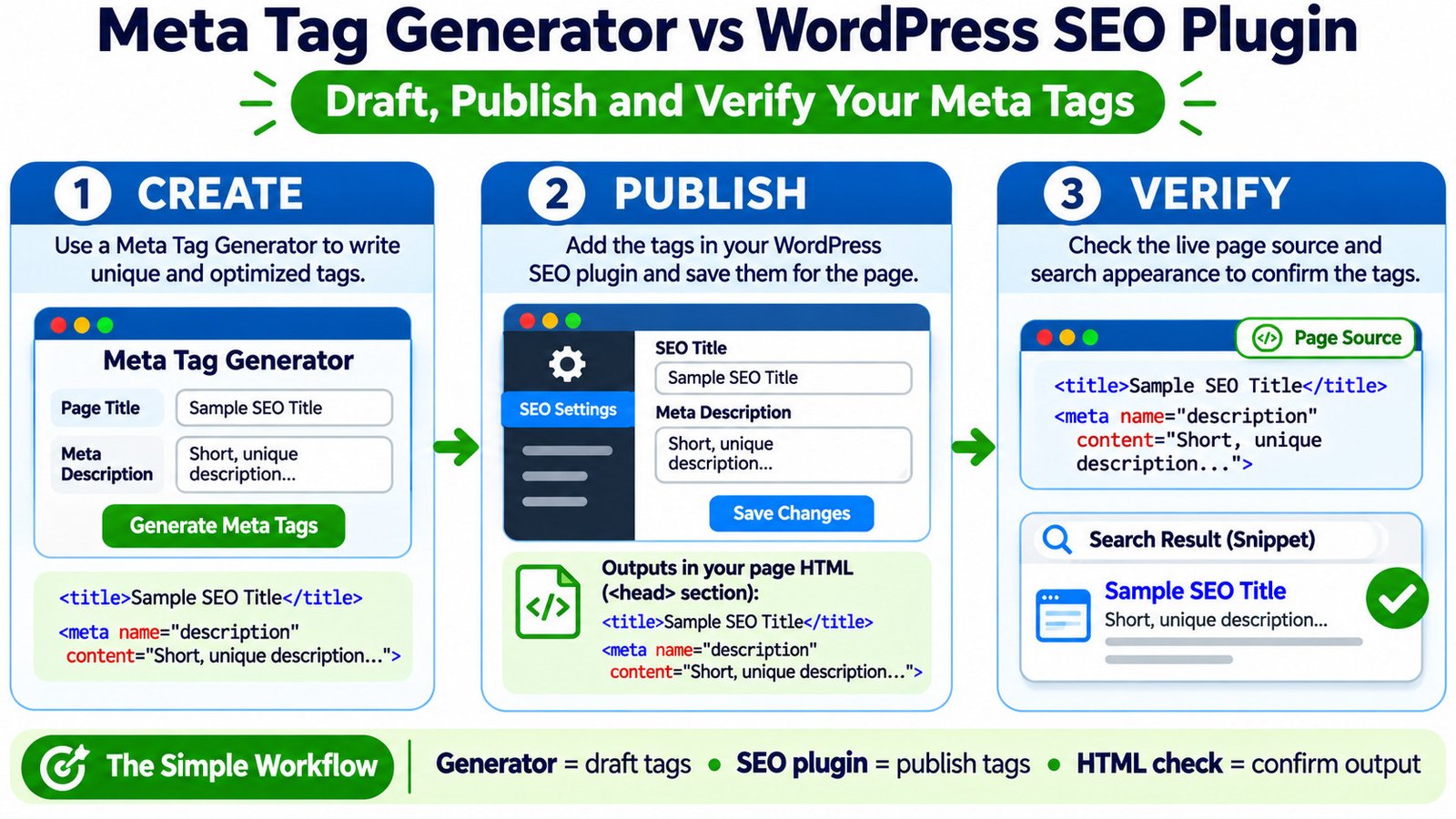
Decision rule: Use a generator when you need help drafting metadata. Use a WordPress SEO plugin when you need WordPress to save, manage, and serve that metadata consistently. Use an HTML check to verify the result in either case.
A Realistic Three-Stage Workflow for One Service Page
Imagine a fictional bicycle shop, Northline Cycles, publishing a page about bicycle tune-ups in Leeds. The page genuinely describes the service, location, and booking process. Its initial metadata is vague:
- Weak SEO title: Bikes, Repairs, Services, Shop
- Weak description: Bicycle repair, bike shop, tune-ups, tyres, services and maintenance.
A clearer draft names the actual service, audience, and location without creating a keyword list:
- Improved SEO title: Bike Tune-Ups in Leeds | Northline Cycles
- Improved description: Book a bicycle tune-up in Leeds at Northline Cycles. Explore what our servicing includes and find out how to arrange your next workshop visit.
The shop and copy are examples, not a live business or tested Google result. The description should only be used if the page truly offers those details.
- Create: use the Meta Tag Generator above to prepare a clear title and description, then edit both to match the page.
- Publish: enter those values in the WordPress SEO plugin’s fields for the specific page, save, and make sure the public page reflects the change.
- Verify: inspect the HTML source and compare the search-preview wording. A preview is illustrative; it is not live search-result evidence.
What the Generated HTML Should Look Like
The SEO title belongs in an HTML <title> element, while the description uses a <meta name="description"> element. The following is an illustrative excerpt from the document head:
<head>
  <title>Bike Tune-Ups in Leeds | Northline Cycles</title>
  <meta name="description" content="Book a bicycle tune-up in Leeds at Northline Cycles. Explore what our servicing includes and find out how to arrange your next workshop visit.">
</head>
The term meta title is common in SEO conversations, but the correct document title element is <title>, not a requirement to insert <meta name="title">. The visible page heading, often an <h1>, is a different element and does not replace the HTML title.
Do not paste this whole head excerpt into a WordPress post’s visual or Custom HTML content block. That adds content within the page body, not the appropriate document-head output. If an SEO plugin already emits the tags, hand-inserting another set can create conflicts or duplicates.
How Rank Math and Yoast SEO Handle the WordPress Side
In a typical Rank Math setup, open the relevant WordPress post or page, choose the Rank Math controls, and select Edit Snippet to edit the SEO title and description. Rank Math also has templates and bulk-editing features for eligible content types, depending on the available settings and edition.
Yoast SEO likewise provides fields for the SEO title, slug, and meta description inside its search-appearance editor. It supports site-level templates and individual page overrides. The exact placement of controls can vary with the WordPress editor, plugin version, enabled features, and administrator permissions.
Both approaches store SEO-related settings in WordPress and generate output as pages are rendered. That means updating a field does not require physically rewriting an HTML file on the server. To verify the result, inspect the served public page, not just the WordPress editor preview.
If you are using Rank Math already, adding a second full SEO plugin just to create a title is usually unnecessary. Mixing metadata output from competing plugins or theme components may result in duplicate titles, descriptions, or conflicting controls. Review the current setup before changing your site-wide SEO configuration.
When a Standalone Generator Is the Better Starting Point
A standalone generator can be useful when a developer is building a static site, when a marketing team drafts text outside a CMS, or when content passes through an approval process before being entered into WordPress. It may also help compare candidate wording without touching a live page.
For a non-WordPress site, the destination system must still put the resulting tags in the right document location. A generated block sitting in a note, spreadsheet, or unrendered template has no effect on public HTML. Similarly, draft text copied into a WordPress page does not automatically become site metadata.
For large editorial sites, a WordPress SEO plugin’s templates are usually more practical for managing defaults. But templates need sensible page-specific overrides: the description of a service page should not be identical to the description of an unrelated article, and dynamic variables must resolve to valid text.
Check the Page Source Before Trusting the Preview
Open your public URL in a browser, choose View Page Source, and search for <title> and name="description". Confirm that the correct values appear within the document <head>, that there is not a second conflicting description, and that the canonical URL points where intended.
The Meta Tags Analyzer is a related tool for reviewing metadata. Use the Google Search Snippet Preview for a visual approximation of how a title and description may read. The preview does not guarantee Google’s chosen title link, snippet, or display length.
If source markup differs from what you see in your browser’s final page, compare the server-returned source with the rendered DOM. The Source vs Rendered HTML Comparison is relevant to that investigation, but verify its actual detection behavior before treating its output as conclusive.
Google Search Console’s URL Inspection report can help assess the indexed page and selected canonical. It does not promise an immediate update in Google Search after your metadata changes. Google may recrawl and reprocess the page later, and its result text may still differ by query.
If the Plugin Says One Thing and the Live HTML Says Another
| What you observe | What it might mean | Next check |
|---|---|---|
| Generated text is never visible on the public page | The draft was not implemented | Save it in the correct SEO fields or site template |
| Editor has the new text; source has the old text | Cache, publishing, or output override | Review page status, caches, SEO plugin and theme output |
| Two meta description tags appear | More than one component may be emitting metadata | Audit active SEO plugins, theme hooks, and custom head snippets |
| Title exists but Google shows different words | Automated title-link selection | Compare title, visible main heading, and page intent |
| Description exists but Google uses page text | Query-dependent snippet generation | Review relevant search queries and page content |
| Title or description is identical across many pages | Generic templates or missing overrides | Review template variables and page-level metadata |
After confirming the basics, check whether the public URL itself is eligible for indexing. The Website Indexability Checker can support the initial review; Google Search Console remains the source for what Google reports about its own index. If the wrong URL is being selected, examine canonical signals with the Canonical Tag Checker rather than endlessly rewriting the meta description.
Which Workflow Should You Choose?
If you manage a normal WordPress blog: draft in the generator if you find it helpful, then enter the final copy in the SEO plugin. There is no need to paste raw HTML manually.
If you run many WordPress posts or products: use an SEO plugin’s templates for stable defaults and customize pages where generic output would be misleading. A Keyword-to-Page Mapping Tool may help document which page addresses each search topic before you write unique metadata.
If you maintain a custom-coded website: a generator may be useful, but you or your developer must integrate its output into the page template or rendering system. Recheck the final HTML after deployment.
If the metadata already looks correct: resist replacing plugins or rewriting fields just because Google’s displayed snippet differs. First inspect the actual tags and compare the search query with the visible content.
Frequently Asked Questions
Can I use a meta tag generator without installing an SEO plugin?
Yes, if your publishing system provides another correct way to put the generated title and description in the document head. WordPress users often find that an SEO plugin or existing site framework is the easiest way to manage this.
Does Rank Math or Yoast automatically write perfect metadata?
No. Default templates can generate usable text, but accurate, page-specific copy still requires editorial judgment. Review titles and descriptions for high-value pages, especially when variables produce vague or repeated wording.
Should I copy generated meta HTML into a WordPress Custom HTML block?
No. The block is part of the content area and is not the correct method for publishing document-head metadata. Add the intended values in the designated SEO settings or use a properly configured developer-level head integration.
Will a generator or WordPress SEO plugin make Google display my exact description?
No. Google generates snippets automatically and may select visible page text when it considers that text more relevant to the search query. A correct description gives Google another useful option, not a display guarantee.
Is it useful to install two full WordPress SEO plugins?
Usually not for the same metadata responsibilities. Overlapping settings and output can be confusing and may create duplicate tags. Use one clearly configured SEO system unless you have a deliberate, tested reason to do otherwise.
Bottom line: a generator writes the draft, a WordPress SEO plugin publishes the metadata, and a live HTML check confirms what was served. Treat those as separate jobs, and you can diagnose errors without confusing an editor setting with a Google search result.