Meta Tags and Click-Through Rate: What You Can Actually Influence
Inspect page titles, descriptions and social tags.
Can Meta Tags Improve Click-Through Rate in Google Search?
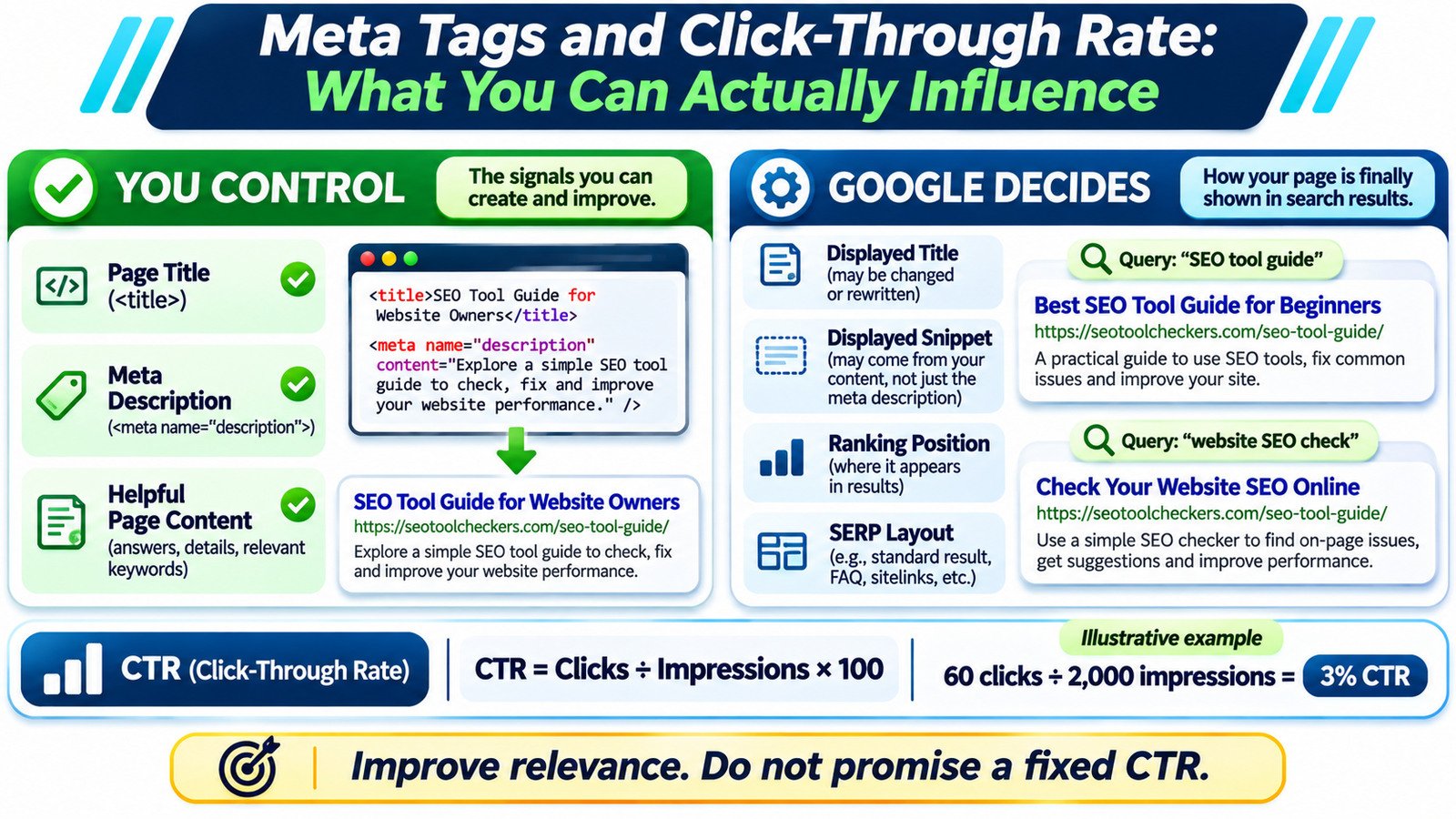
Titles and meta descriptions can influence how appealing a search result looks, but they cannot guarantee a higher click-through rate (CTR). You can write an accurate HTML title, a useful meta description and content that answers the query. Google may generate different title links or snippets, while ranking position and the surrounding results also affect clicks. Use Google Search Console to judge whether a change helped, not a snippet preview alone.
Meta Tags Analyzer
Inspect page titles, descriptions and social tags.
Make Search Results More Useful Without Promising More Clicks
A page can have a perfectly written meta description and still attract fewer clicks than expected. Its search position may have changed, Google may have displayed a different snippet, or searchers may have found their answer directly on the results page. That is why editing metadata is an opportunity to improve relevance, not a controllable CTR switch.
Start by checking the page’s actual metadata with the Meta Tags Analyzer. Then compare what is in the HTML with the visible title and snippet for your important search queries. This guide separates the elements you can edit from Google’s automatic presentation choices, shows before-and-after examples, and explains how to test results using impressions, clicks, device filters and comparable search queries. The aim is a clearer search result that accurately represents the page.
To test changes responsibly, compare Search Console exports before and after the edit instead of relying on anecdotal clicks. When multiple pages serve a similar query, also check keyword cannibalization versus healthy topic clusters.
What You Can Edit and What Google Chooses to Display
SEO discussions often group the <title> element with meta tags, although technically it is an HTML title element rather than a <meta> tag. You can edit both the title element and <meta name="description">. You can also improve the page heading, introductory text, and answers that might be relevant when Google constructs a result.
Google does not promise to print either field exactly as you wrote it. Title links can incorporate a page’s visible heading, prominent text, anchor text, and other signals. Descriptive snippets are created mainly from relevant page content; Google sometimes uses the supplied meta description. The wording a searcher sees may change from one query to another.
| Element | What you control | What remains uncertain |
|---|---|---|
| HTML title | Clear, accurate, distinctive wording | Google’s displayed title link |
| Meta description | Page-specific summary and useful details | Whether the description is shown |
| Visible content | Answers, examples, headings and context | Which passage becomes the snippet |
| Search result position | Technical and content improvements that may help overall SEO | Google’s ranking for a particular search |
| SERP appearance | Eligible structured data and accurate page signals | Which features appear and how results are arranged |
Write a Title That Sets the Correct Expectation
The useful question is not simply whether a keyword fits in the title. Ask whether someone can identify the page’s topic, audience and practical value without being misled. Google advises descriptive, concise, distinctive titles and warns against repeated boilerplate or keyword stuffing. There is no official fixed character limit that guarantees an uncut title link.
Consider an imaginary article about checking redirects after a website move:
| Version | Example title | Likely issue or benefit |
|---|---|---|
| Weak | SEO Tips, Redirect Tips, Website SEO Guide | Generic and repetitive; intent is unclear |
| Stronger | How to Check 301 Redirects After a Site Migration | Names the task and the audience’s situation |
Put the main topic where it is easy to scan, but do not add a year, a percentage, or a promise unless the content supports it. Align the visible page heading with the title’s meaning. If your heading says one thing and the HTML title says another, Google has more reason to select a different title link. Use the Heading Structure Checker when a template introduces competing or confusing headings.
Write Descriptions That Reflect the Page, Not a Sales Pitch
A useful meta description gives the searcher a concise reason to expect a relevant answer. It should explain the topic, indicate the practical task, and include meaningful details that are genuinely available on the page. Repeating keywords or claiming guaranteed SEO improvements usually makes a description less helpful.
For the same imaginary redirect guide, compare these illustrative descriptions:
Weak:
Best SEO redirects, redirect SEO, SEO redirect help, best SEO tips.

Better:
Check 301 redirects after a website migration. Learn how to find broken
chains, wrong destinations, and old URLs that no longer resolve.
A preview can show approximate length and layout, but Google does not prescribe a universal 155-character cap. Snippets can be shortened to fit the available display, and the text may be replaced with a passage that better matches the query. Try the Google Search Snippet Preview to catch obvious readability problems, then treat its output as a mockup rather than Google’s final result. The Meta Tag Generator can help draft markup, but the finished words still need editorial review.
Check the Actual HTML Before Testing CTR
When metadata looks correct inside WordPress but a checker reports something different, inspect the page’s generated source. SEO plugins, themes, page builders, caches and custom code can affect the final HTML. A typical implementation looks like this:
<title>How to Check 301 Redirects After a Site Migration</title>
<meta name="description" content="Check 301 redirects after a website migration. Learn how to find broken chains, wrong destinations, and old URLs that no longer resolve.">
There should be a relevant title and a consistent, page-specific description. Avoid multiple competing description tags caused by running two SEO plugins or adding hand-coded metadata over your existing settings. In WordPress, update the title and description through your configured SEO system, clear the relevant cache, and recheck the public HTML. The Open Graph and Social Share Preview is useful for social sharing, but a social preview is not proof of a Google search snippet.
Understand CTR Before Calling an Edit Successful
CTR equals clicks divided by impressions, multiplied by 100. If Search Console shows 60 clicks from 2,000 impressions, the CTR is 3%. That number describes observed clicks for a report segment; it does not explain why people clicked or ignored the result.
Suppose a page receives 60 clicks from 2,000 impressions before a title update and 84 clicks from 2,400 impressions afterward. CTR moves from 3% to 3.5%. This is an illustrative calculation, not a measured SEO case study. The result looks promising, but the higher percentage cannot automatically be credited to the edited title: search queries, average position, the mix of devices, seasonality and competing results might also have shifted.
Google Search Console can group performance by query, page, country, device and search appearance. Its site-level totals may not match URL-level tables because property and page aggregation work differently. Compare equivalent segments rather than interpreting a single sitewide percentage as proof that the snippet rewrite worked.
A Repeatable Search Console Test for Title and Description Changes
- Choose one important page. Find queries where it earns meaningful impressions and where the displayed result could explain weak clicks.
- Record the baseline. Save the page, top queries, search type, country, device, date range, clicks, impressions, CTR and average position.
- Inspect the search result. Search representative queries and record what title and snippet Google currently displays. Results can vary by context.
- Change only what needs fixing. Revise an unclear title or description and make sure the visible page still fulfills its promise. Note the edit date.
- Allow time for recrawling. Google must revisit and process the page; immediate results are not reliable evidence.
- Compare comparable periods. Review the same page-query groups and devices, and account for changes in position and impression mix.
Use the Search Console CSV Comparison Analyzer to organize before-and-after exports. The Search Console Regex Builder and Tester can help define consistent query groups, such as questions or brand variations. A filter can omit anonymized queries, so filtered sums need not equal your property totals.
When Low CTR Is Not Really a Metadata Problem
Look beyond the snippet before rewriting every page. A low average position usually changes the visibility context. A page may appear for broad informational searches where the user wants a quick answer rather than a visit. A brand-specific query can behave differently from an unfamiliar product search. Search features, neighboring results, mobile layout and local intent also affect what the user sees.
For diagnosis, compare the same query across time and inspect which page Google chooses. If multiple URLs target the same intention, revisit the page’s role with the Keyword-to-Page Mapping Tool. If position changed substantially, check the trend with the SERP and Keyword Position Checker rather than attributing all click movement to copy. Improving the actual answer often matters more than increasing urgency in the snippet.
Use a CTR Diagnostic, Not a Universal Benchmark
A blanket statement such as “every page at position five should earn a particular CTR” ignores the searches and results that produced the impressions. Start with the page’s actual query portfolio. A page answering a factual question may compete with an on-page answer; a product comparison may face shopping modules and advertisements. Even two queries with the same reported average position can have different click opportunities. Look for sustained patterns across a meaningful sample, not a single quiet day.
| Observed pattern | First investigation |
|---|---|
| Stable position, impressions and low CTR | Inspect actual titles and snippets against query intent; improve clarity if they misrepresent the page. |
| CTR falls while average position worsens | Investigate the visibility or ranking change before attributing the loss to metadata. |
| CTR changes after new queries appear | Separate established queries from new ones; the audience mix may be different. |
| Very few impressions | Gather a longer observation window instead of treating one click as a strong signal. |
After an edit, keep a dated record of the old and new wording. If Google continues to show a different title or snippet, note that outcome rather than reporting the planned wording as the live result. Good metadata testing means observing actual search behavior while acknowledging the pieces you cannot control.
Three Metadata Myths Worth Discarding
- “Exactly 60 and 160 characters guarantees full display.” Google has no such guaranteed limits; available space and automatic text selection vary.
- “Meta keywords increase Google rankings.” Google explicitly says it does not use the
meta keywordstag for indexing or ranking. - “A higher CTR proves the new description caused it.” CTR is an observation, not a controlled experiment. Changes in audience, rankings and SERP composition are alternative explanations.
One final distinction: a strong title and description can help visitors judge relevance, but they cannot rescue a page that fails to satisfy the search intent. Treat metadata, visible content and technical access as a connected editorial task, not isolated boxes to fill. The best outcome is not a predicted percentage; it is a more accurate expectation for the people who decide to click.