Why Google Changes Your Page Title in Search Results
Preview a simulated desktop or mobile search result.
Why Does Google Change the Title of My Page in Search Results?
Google may display a title link that differs from your page’s HTML <title> because it automatically selects wording that best describes the result. It can consider the visible page heading, prominent text, Open Graph title, and links pointing to the page. An inaccurate, repetitive, outdated, or unclear title increases the chance of a different display. A snippet preview helps you review proposed wording but cannot force Google to use it.
Google Search Snippet Preview
Preview a simulated desktop or mobile search result.
Edit snippet text
Simulated search result
Illustrative preview only. Actual search snippets, titles, wrapping, and truncation are chosen by search engines and may differ.
Understand and Troubleshoot Google’s Rewritten Title Links
You set a careful SEO title in WordPress, publish the page, and then find a different headline in Google. Sometimes the brand name disappears; sometimes Google uses your main heading instead. Other times the result looks shorter because the display space has run out. These are not all the same issue, and blindly changing the title again can make the diagnosis harder.
The useful question is which title-related signals Google can actually see, and whether they tell the same story. Start by examining the published HTML and prominent on-page wording, not just a plugin’s snippet editor. Then compare those findings with the title link displayed in Search. This guide explains the main causes, shows an example you can adapt, and gives a practical way to correct conflicting signals without promising a specific Google result.
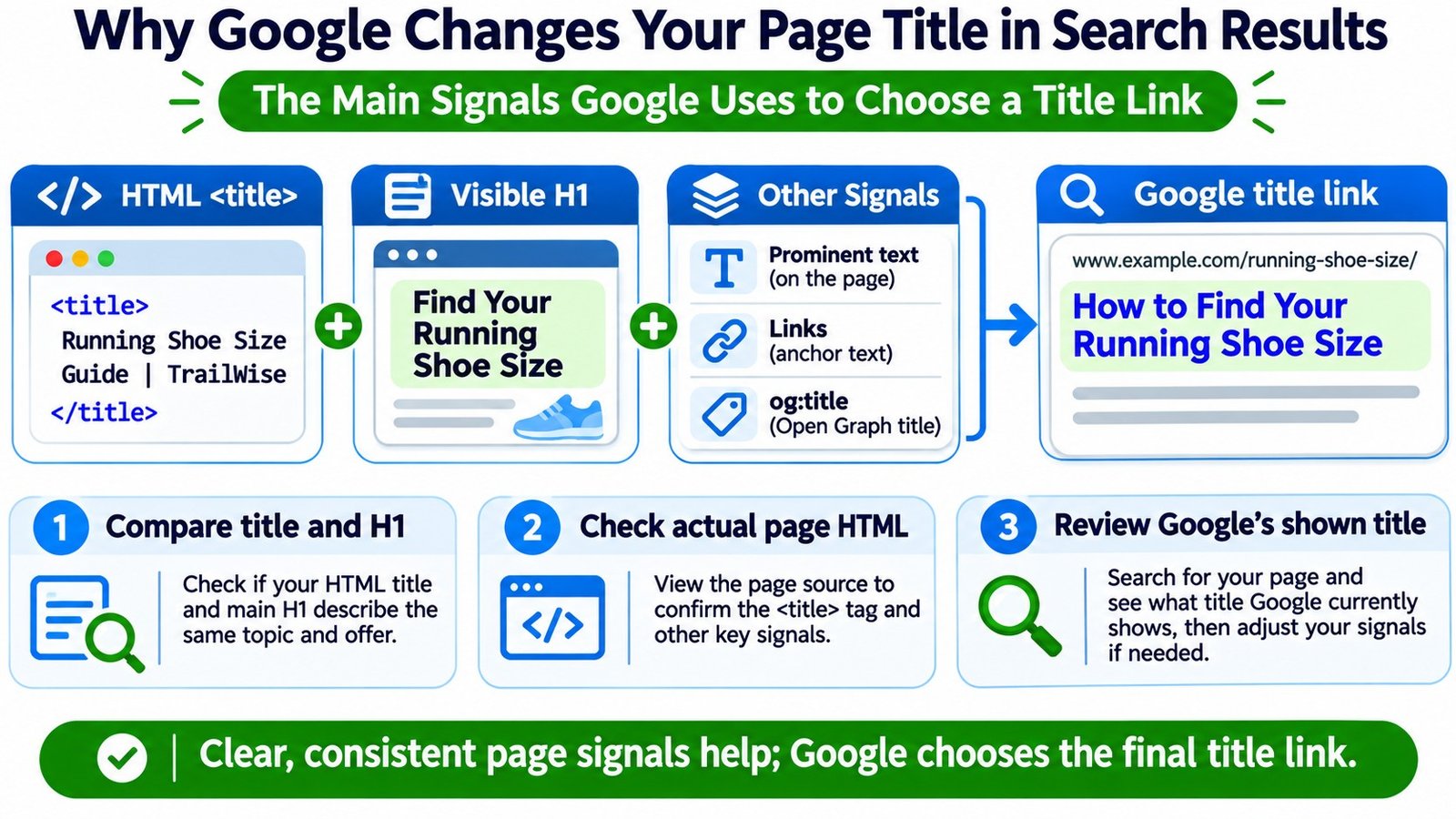
Four Different Titles Can Describe the Same Webpage
People often call all of these the SEO title, but they are produced in different places. Understanding the difference makes title-link troubleshooting much faster.
| Title signal | Where it appears | What it tells you |
|---|---|---|
HTML <title> |
Inside the document <head>; often shown in the browser tab |
The title the website supplies to browsers and search engines |
| Visible main heading | On the page, commonly as an <h1> |
What visitors encounter as the main topic or headline |
og:title |
Open Graph metadata in the page’s <head> |
A title used by sharing systems and another signal Google may consider |
| Google title link | Clickable headline in a Google search result | Automated text selected by Google, not an element you can directly set |
For example, a WordPress post can have an SEO title of Mountain Bike Tire Pressure Guide | RidgeTrail while its visible H1 says What PSI Should You Use on Rocky Trails?. Both may be reasonable, but they emphasize different angles. Whether they are a problem depends on what the page actually covers.
Where Google Gets the Words for a Title Link
Google Search Central lists several possible inputs, including the page’s <title> element, the main visual title, headings, og:title, large or prominent text, other page text, on-page anchor text, incoming link text, and relevant WebSite structured data. They are signals, not a priority list you can control.
That matters because a page can contain a technically valid title tag and still communicate a clearer title somewhere else. If the visible headline is specific but the HTML title is generic, Google has reasons to look beyond the tag. The goal is not to force identical wording everywhere. It is to make the primary subject, page purpose, and branding consistent enough that neither visitors nor search systems need to guess.
Common Reasons Google Shows a Different Page Title
1. The HTML title is empty, generic, or incomplete
A title such as Home, Article, or | Brand Name gives little context. When the main heading provides more useful information, Google may use it. Check whether the SEO title field is blank, a template variable failed to resolve, or a theme outputs an incomplete title.
2. The title promises something the page does not deliver
Suppose the title says Complete Laptop Repair Price List but the page is an appointment form with no prices. Google may choose wording closer to the visible content. The editorial fix is to align the title with the actual purpose rather than add more keywords.
3. Headings compete with one another
If several large headings appear before the main article, it may be unclear which one is the primary title. A promotional banner or category label styled like a headline can compete with the page H1. Give the actual main heading clear visual prominence and use a logical hierarchy. The Heading Structure Checker can support a structural review.
4. Many pages repeat nearly the same title
Product variants, archive pages, local landing pages, and series posts may share a site-wide template that obscures what makes each URL distinct. Google documents a related problem known as micro-boilerplate. Keep shared branding concise while identifying the unique product, location, season, or topic on each page.
5. The title includes outdated information
A heading that has been updated for the current season while the title still mentions an old year creates an obvious conflict. Check both page content and metadata before changing only the date. A current year in the title must be supported by genuinely current information on the page.
6. Long titles, keyword piles, or repetitive brand names obscure the topic
Long titles can be truncated to fit the available display width. Google can also generate a different title when wording is repetitive or unhelpful. These are separate outcomes: an ellipsis is not automatically a rewrite. There is no fixed Google character limit that guarantees display; device width and rendered text matter.
7. Language or site-name signals disagree
Google may favor the dominant language or writing system of a page when the HTML title uses something different. It can also omit a duplicated site name when the result already identifies the website. This does not necessarily signal a technical error.
8. Google cannot crawl the page normally
If robots.txt blocks crawling, Google may have to rely more heavily on off-page signals such as incoming link text. A blocked URL can sometimes still appear in results. Use the Website Indexability Checker to support a preliminary review, then confirm crawl and index details in Google Search Console.
Changed Title or Just Cut Off? Read the Symptom Before Editing
| Observation | Likely explanation | Useful next action |
|---|---|---|
| Your original words end with an ellipsis | Visual truncation because of display width | Move the most useful words earlier; preview readability |
| Google uses your page H1 instead | Visible heading may describe the page more clearly | Compare the title, H1, and actual content |
| Brand name disappears | Brand duplication or a shorter selected title | Keep branding concise, but do not assume a fault |
| An old year persists in the result | Outdated signals or a result not yet reprocessed | Confirm live source, update all relevant fields, allow recrawling |
| Several pages show almost the same title | Shared title template or repeated boilerplate | Write distinctive page titles and review template variables |
| SEO plugin says one title but source shows another | Different WordPress output, caching, or another integration | Inspect the public HTML before evaluating Google |
A Google Search Snippet Preview can help assess proposed wording and possible truncation, but it is a mock-up. Actual search layouts and title selection are decided by Google.
A Practical Before-and-After Example
Imagine a fictional cycling site, RidgeTrail, with a detailed article about tire pressure for mountain bikes. The page initially sends mixed signals:
- HTML title: MTB PSI, Tires, Bikes, Wheels, Cycling Tips | RidgeTrail
- Main H1: How to Set Mountain Bike Tire Pressure
- Actual page: Explains tire pressure factors, rider weight, terrain, tire width, and adjustment methods
The HTML title looks like a keyword inventory while the H1 accurately describes the guide. A better title candidate might be Mountain Bike Tire Pressure Guide | RidgeTrail. The visible heading can stay more conversational, provided both refer to the same useful guide.
An illustrative implementation looks like this in the actual document head and page body:
<head>
  <title>Mountain Bike Tire Pressure Guide | RidgeTrail</title>
  <meta property="og:title" content="Mountain Bike Tire Pressure Guide | RidgeTrail">
</head>
<body>
  <h1>How to Set Mountain Bike Tire Pressure</h1>
</body>
That sample is intentionally simplified and fictional. Do not paste the entire excerpt into a WordPress Custom HTML block. Use the SEO settings or approved theme integration to manage document-head metadata. The value of the example is clear subject alignment, not that matching tags will guarantee an unchanged title link.
How to Diagnose a Rewritten Google Title Step by Step
- Record the exact URL and displayed title. Note the search context and date. Search results can be presented differently depending on circumstances, so do not treat one screenshot as a permanent universal title.
- Inspect the published page source. Open the public page, choose View Page Source, and locate its
<title>. Use the Meta Tags Analyzer as a supporting metadata check. The WordPress editor field by itself is not proof of public output. - Compare source HTML with the rendered page. JavaScript or site components may change browser-visible text. If there is a mismatch, examine the response and DOM separately using the Source vs Rendered HTML Comparison as an investigation aid.
- Check the main visible headline. Read the H1 and other prominent text in context. If the title describes a different promise than the page fulfills, revise the copy or page content rather than forcing a keyword.
- Review additional signals. Look at
og:title, prominent promotional headlines, breadcrumbs, and internal link anchor text. The Open Graph and Social Share Preview is relevant for the social metadata portion; don’t assume it recreates Google’s title-link decision. - Check the indexed URL. Use Google Search Console URL Inspection to see the Google-selected canonical and indexing information available for the URL. A different canonical or inaccessible page can complicate the investigation; Search Console does not provide a switch to manually override a displayed title.
- Make one coherent correction and monitor. Adjust metadata, H1, or templates as needed, publish, and validate the live HTML. Google may take days to weeks to recrawl and reprocess changes. A recrawl request is not a guarantee of when the displayed title will update.
If you are unsure whether mobile users receive a different main heading or page section, review responsive output with the Mobile vs Desktop Content Comparison. Do not assume that a desktop-only page-source check tells the whole story for heavily dynamic sites.
What to Fix in WordPress When Rank Math Shows the Right Title
For a typical Rank Math installation, open the affected post or page and look for its Edit Snippet control. Review the SEO title, especially variables that may add a category or site name. Save the post, clear any relevant website or CDN caches, then inspect the public page’s <title> element. The specific editor controls may differ by plugin version and site configuration.
If the public HTML still differs from what you entered, examine SEO title templates, theme output, custom head snippets, caching, and any overlapping SEO extensions. Avoid installing a second full SEO plugin solely to change a single title. If the live HTML matches your intended title, the remaining issue is Google’s automated title-link selection, not necessarily WordPress.
You can draft a clearer alternative with the Meta Tag Generator, but check that its wording accurately represents the page. For a group of near-duplicate landing pages, the Keyword-to-Page Mapping Tool may help clarify which topic each page owns before titles are rewritten.
Does Google Rewrite Titles for Every Search Query?
Do not confuse title links with search-result descriptions. Google’s 2021 title-generation update said its title system was designed to describe the page overall and generally no longer change its title according to each query. In contrast, snippets can draw from different passages of page text for different searches. Google’s title-link generation remains automated, and search presentation can still evolve, so the practical recommendation is to write an accurate, page-level title rather than chase every query with a different headline.
Similarly, there is no useful promise that a score from an SEO plugin, a fixed word count, or an exact-match H1 will stop every rewrite. The strongest controllable inputs are factual wording, distinctive page identity, clean HTML output, and a visible headline that agrees with the content.
Frequently Asked Questions
Can I force Google to show my exact SEO title?
No. The HTML <title> expresses your preference, but Google generates the title link automatically. Improve clarity and consistency; do not assume any change guarantees a particular result.
Does my H1 have to match the SEO title word for word?
No. They can be phrased differently while describing the same primary subject. A mismatch becomes worth investigating when the H1 and HTML title imply substantially different topics or offers.
Does a rewritten title mean my page has an SEO penalty?
No. A different title link by itself is not proof of a penalty or ranking problem. Review whether the displayed wording is accurate and whether your source, headline, and page intent are consistent.
How long will it take Google to show an updated title?
Google must recrawl and reprocess relevant signals. Its documentation says that can take days to weeks. There is no guaranteed deadline or guarantee it will display your preferred wording afterward.
Can a long title be changed without actually being rewritten?
Yes. A result may simply truncate a long title visually. Compare the words that are shown with your actual title before deciding Google substituted different text.
Will changing the meta description fix a rewritten title link?
Usually not. A meta description can help describe the page in the snippet, but the title link is a separate element generated using title-related signals. Diagnose those signals directly.
Bottom line: inspect what WordPress publishes, compare it with the main visible headline and page purpose, and fix genuine inconsistencies. Use a search-preview tool to improve readability, not as evidence that Google must display an exact title.